Key Takeaway
In BLE, a Peripheral advertises and a Central scans and connects. The rules for finding and connecting are GAP; the rules for exchanging data once connected are GATT, whose data is organized as a service → characteristic → descriptor tree identified by UUIDs. On Linux, BlueZ bluetoothctl reads a value with connect → menu gatt → select-attribute → read. When you automate the test, don’t treat ServicesResolved: yes as a PASS; only pass when a value appears on the line after Attempting to read ….
When you test a BLE device or integrate one with an app, you often hit “it connected, but I can’t read the value.” This post covers the basic structure of GATT, hands-on reading with Linux BlueZ bluetoothctl, and PASS criteria for automated connection tests, all in one place.
What do the Central and the Peripheral each do?
One-line answer: the Peripheral advertises “I’m here,” and the Central scans for that advertisement and connects.
- GAP (Generic Access Profile, Bluetooth Core Specification Vol 3 Part C) defines the LE connection roles Central and Peripheral. A phone or Linux PC is usually the Central; a battery-powered sensor, wearable or appliance module is usually the Peripheral.
- Advertising happens before any connection. The Peripheral periodically sends short packets on the advertising channels, which can carry the device name or the UUIDs of the services it offers. The Central picks them up by scanning and learns which devices are nearby.
- A connection starts when the Central sends a connection request in response to a particular advertisement. After that, the two devices exchange data at agreed intervals, and GATT runs on top. In short: advertising is one-to-many broadcast, a connection is a one-to-one conversation.
How are GAP and GATT different?
One-line answer: GAP decides how devices find and connect to each other; GATT decides what data is read or written after the connection, and how.
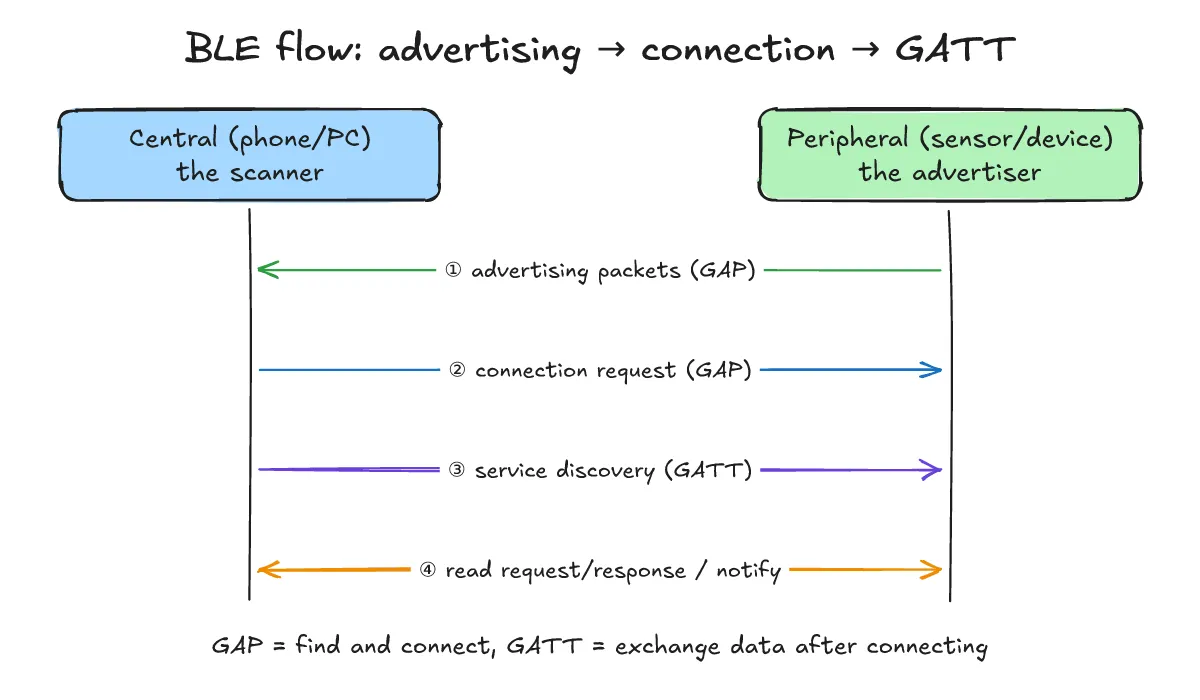
- GAP covers roles (Central/Peripheral), advertising and scanning, and connection setup. If a device won’t connect, the problem is usually at the GAP stage: no advertising, not showing up in the scan, or the connection request timing out.
- GATT (Generic Attribute Profile, Core Spec Vol 3 Part G) runs on top of ATT (Attribute Protocol, Vol 3 Part F). The side that holds the data is the GATT server and the side that asks for it is the GATT client. The Peripheral is often the server and the Central the client, but GAP roles and GATT roles are separate ideas. That’s why “connected” (GAP) and “value read” (GATT) are different success criteria, which comes back in the PASS verdict section below.
How do services, characteristics and UUIDs fit together?
One-line answer: a service groups a feature, a characteristic holds one actual value, and a UUID is the label that names each of them.
- A service groups related data. For example, the Bluetooth SIG-defined Battery Service (UUID
0x180F) holds battery-related values. - A characteristic is one actual value inside a service, plus its properties (read, write, notify and so on). Battery Level (UUID
0x2A19) inside the Battery Service is the classic example; its value is the remaining battery charge in percent. A characteristic can have descriptors; the most common is the CCCD (Client Characteristic Configuration, UUID0x2902), which turns notifications on and off. - UUIDs come in two kinds: 16-bit values assigned by the SIG (listed in the Bluetooth Assigned Numbers document), and 128-bit values vendors create for their own services. Per the Core Spec (Vol 3 Part B, Bluetooth Base UUID), a 16-bit UUID expands to the 128-bit form
0000xxxx-0000-1000-8000-00805F9B34FB. A custom service uses a 128-bit value such as12345678-1234-5678-1234-56789abcdef0(an example UUID for illustration only).
When do you use read, and when notify?
One-line answer: use read to ask once when you need the value; use notify to get it every time it changes.
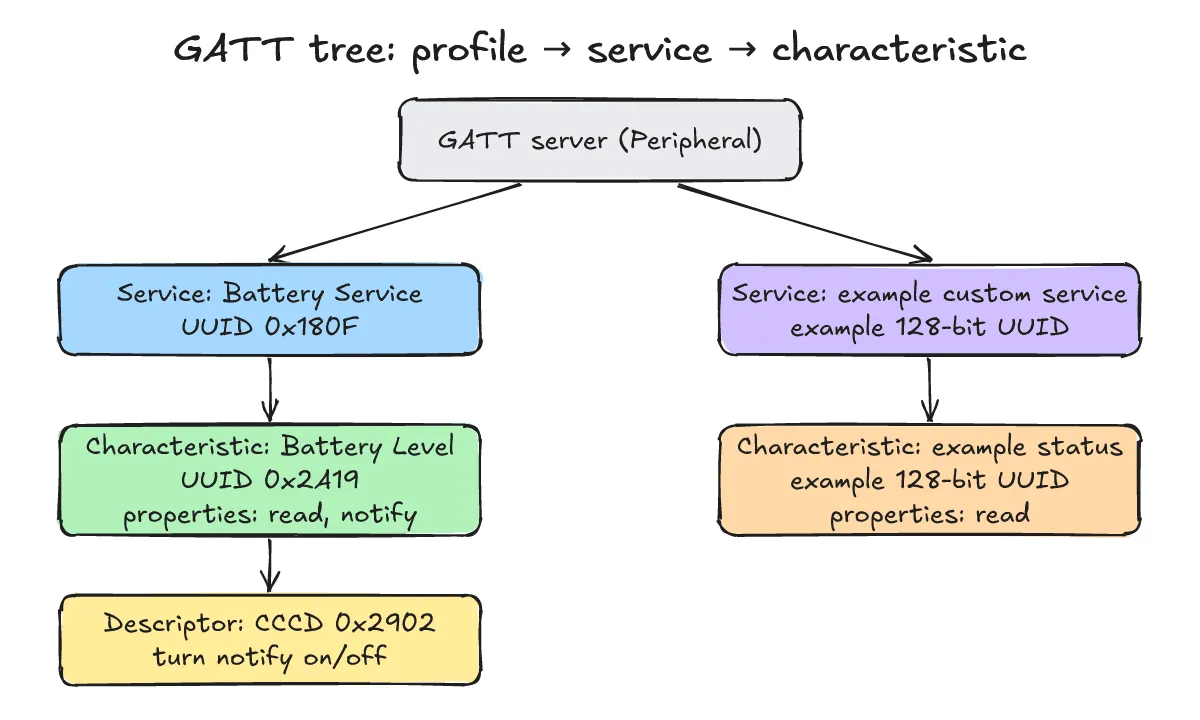
- read: the client asks and the server replies with the current value. It’s also the simplest way for a test to check that GATT communication actually works.
- notify: once the client writes the enable value to the CCCD, the server pushes the value whenever it changes. The acknowledged variant is called indicate. Compared with polling (repeated reads), it saves power and radio airtime.
What do UUID expansion and value decoding look like in code?
One-line answer: drop a 16-bit SIG UUID into the Base UUID to get the 128-bit form, and read Battery Level’s single byte directly as a percentage.
- Here’s a small Python example that shows the GATT tree and UUID expansion without any real BLE hardware. The value
0x55is an example value for illustration.
# Example: 16-bit SIG UUID -> 128-bit (Bluetooth Base UUID) and Battery Level decoding
BASE = "0000{:04x}-0000-1000-8000-00805f9b34fb"
def full_uuid(short): return BASE.format(short)
tree = {0x180F: ("Battery Service", {0x2A19: ("Battery Level", ["read", "notify"])})}
for s, (sname, chars) in tree.items():
    print(f"Service {sname}: {full_uuid(s)}")
    for c, (cname, props) in chars.items():
        print(f"  Characteristic {cname}: {full_uuid(c)} props={props}")
raw = bytes([0x55])  # example value read from 0x2A19 (uint8, percent)
print("Battery Level =", raw[0], "%")
Actual output from running it on Python 3.13.5:
Service Battery Service: 0000180f-0000-1000-8000-00805f9b34fb
  Characteristic Battery Level: 00002a19-0000-1000-8000-00805f9b34fb props=['read', 'notify']
Battery Level = 85 %
What do you need, and how do you check bluetoothd?
One-line answer: a Linux PC with a BLE adapter, a phone that advertises with an app like nRF Connect, and a running bluetoothd.
- Central: a Linux PC with a built-in or USB Bluetooth adapter. BlueZ’s
bluetoothdmanages the adapter and exposes it over D-Bus;bluetoothctlis an interactive client for that D-Bus API. On systemd distributions,systemctl status bluetoothshows whether the daemon is running. - Peripheral: install Nordic’s nRF Connect app on a phone and expose a service such as the Battery Service (0x180F) via its advertiser or GATT server settings. A real dev board works too if you have one.
In what order do the commands go, from scan to GATT read?
One-line answer: find and connect in the main menu, then enter menu gatt, select the characteristic and read it.
- Here is the whole flow. This session is an example (the machine used to write this post has no BLE adapter, so there’s no real device output); the command names were checked against BlueZ 5.82
bluetoothctl. The addressAA:BB:CC:DD:EE:FFis an example.
# Example session (AA:BB:CC:DD:EE:FF is an example address)
$ systemctl status bluetooth        # is bluetoothd running?
$ bluetoothctl
[bluetoothctl]> power on
[bluetoothctl]> scan on
[bluetoothctl]> scan off
[bluetoothctl]> connect AA:BB:CC:DD:EE:FF
[bluetoothctl]> info AA:BB:CC:DD:EE:FF     # check Connected / ServicesResolved
[bluetoothctl]> menu gatt
[bluetoothctl]> list-attributes
[bluetoothctl]> select-attribute 00002a19-0000-1000-8000-00805f9b34fb
[bluetoothctl]> attribute-info
[bluetoothctl]> read
[bluetoothctl]> back
[bluetoothctl]> disconnect AA:BB:CC:DD:EE:FF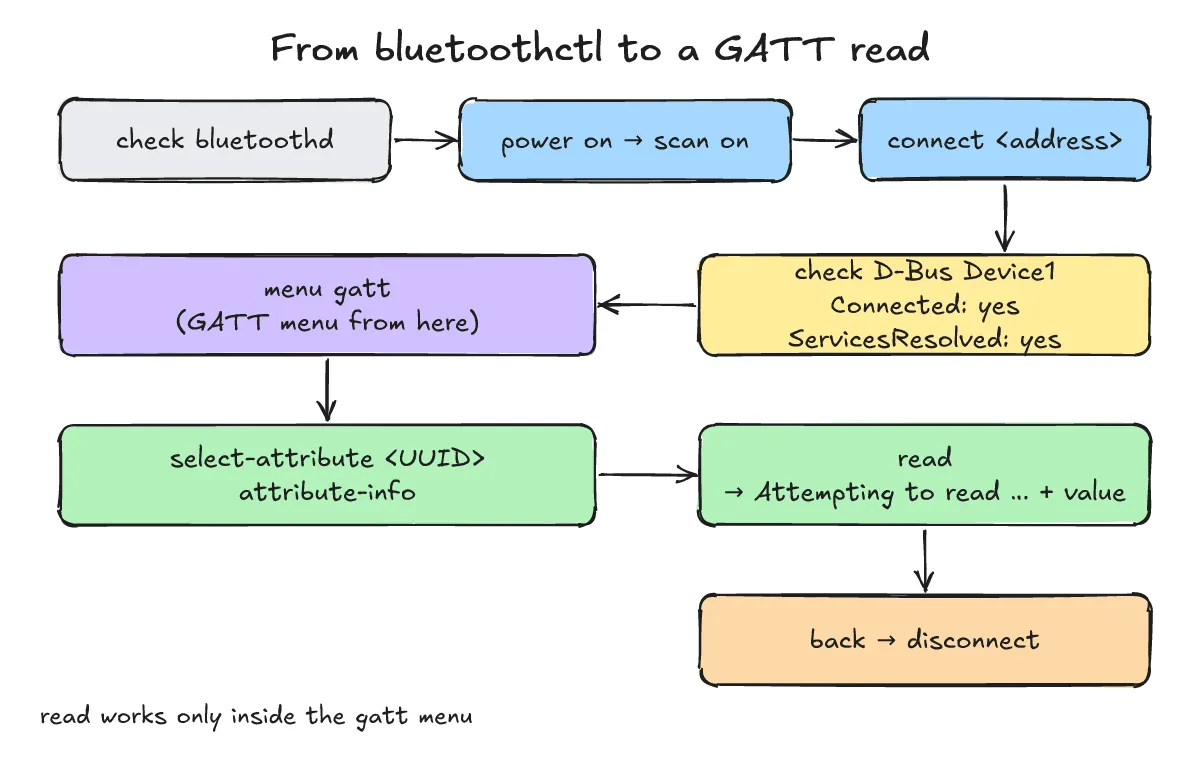
- Use
scan onto watch nearby advertisements, find the target address, then stop withscan off. If you seeConnection successfulafterconnect, the GAP connection is up. - Inside
menu gatt,list-attributeslists service and characteristic paths with their UUIDs.select-attributetakes a D-Bus path or a UUID;attribute-infoshows the selected item’s UUID and properties (Flags); thenreadprintsAttempting to read …followed by the value. When you’re done,backto main anddisconnect.
What do Connected and ServicesResolved mean?
One-line answer: Connected means the link is up; ServicesResolved means discovery of the remote GATT services has finished.
- In the BlueZ docs (
org.bluez.DeviceD-Bus API),ConnectedandServicesResolvedon theorg.bluez.Device1interface are boolean properties for “is the device connected” and “has service discovery finished.” You can see them withinfo <address>inbluetoothctl, or query D-Bus directly:
# Example: query a Device1 property over D-Bus (hci0 and the address are examples)
$ busctl get-property org.bluez /org/bluez/hci0/dev_AA_BB_CC_DD_EE_FF \
org.bluez.Device1 ServicesResolved- GATT commands only make sense after service discovery, so it’s safest to wait for
ServicesResolved: yesbefore moving tomenu gatt. Still, that only means “discovery finished,” not “a value was read.” The test-verdict problems this gap causes are covered below.
Why do you get Invalid command in menu main: read?
One-line answer: read is a gatt-menu command, and you typed it in the main menu.
bluetoothctlsplits its commands into menus such as main and gatt; a command that isn’t in the current menu printsInvalid command in menu <menu>: <command>. Below is a real run on the machine used for this post (BlueZ 5.82) checking the message strings inside the binary:
$ bluetoothctl --version
bluetoothctl: 5.82
$ strings /usr/bin/bluetoothctl | grep -iE 'invalid command in menu|Attempting to read'
Attempting to read %s
Invalid command in menu %s: %s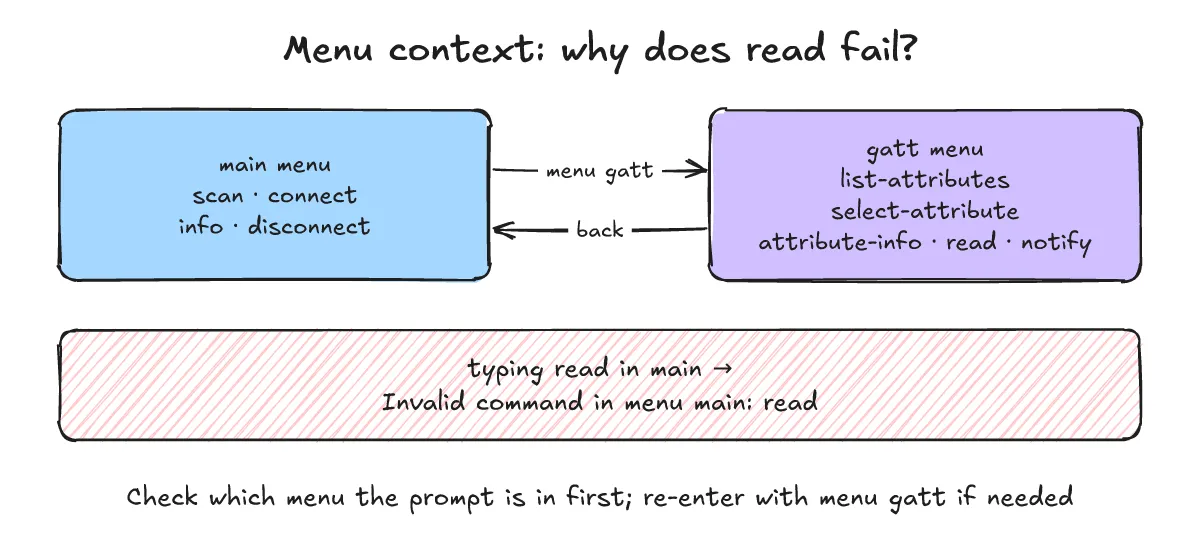
- Two cases are common: forgetting
menu gatt, or piping commands from a script where a straybackor a fresh session drops you back to main. Check which menu the prompt is in first, and re-entermenu gattif needed.
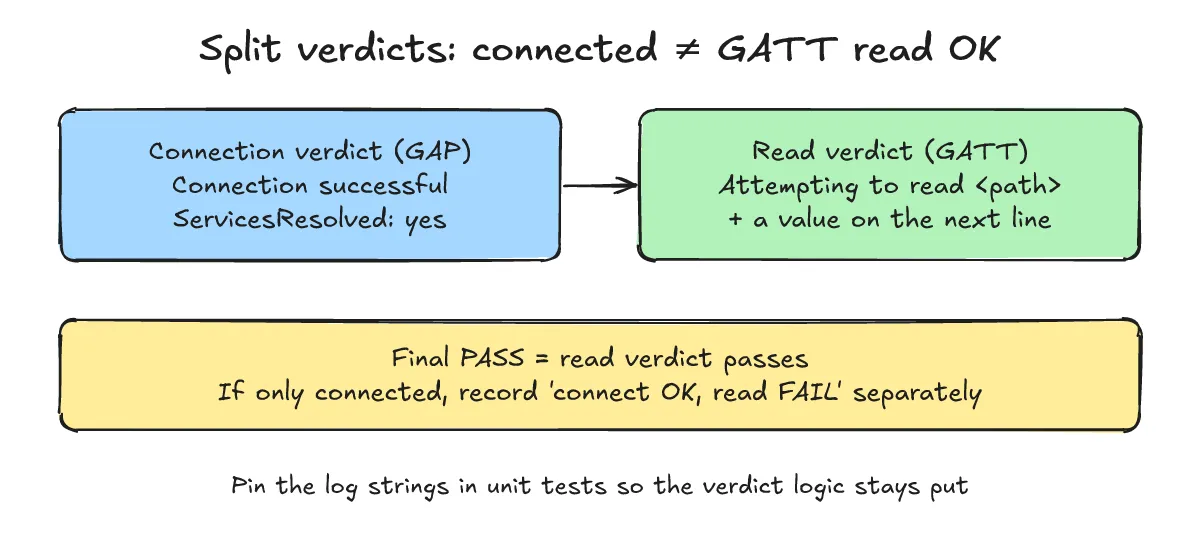
Why isn’t ServicesResolved alone enough for a PASS?
One-line answer: ServicesResolved is a midpoint meaning “service discovery finished,” not evidence that a value was actually read.
- In the BlueZ docs,
ServicesResolvedis the property that says whether service discovery has finished. The link can still drop right after discovery, and then the GATT commands that follow never run. - So split the verdict in two. The connection verdict is
Connection successfulplusServicesResolved: yes; the read verdict is a value printed on the line right afterAttempting to read <path>. Base the final PASS on the read verdict alone, and record connected-only cycles separately as “connect OK, read FAIL” for root-cause analysis.
What do the common failure patterns look like?
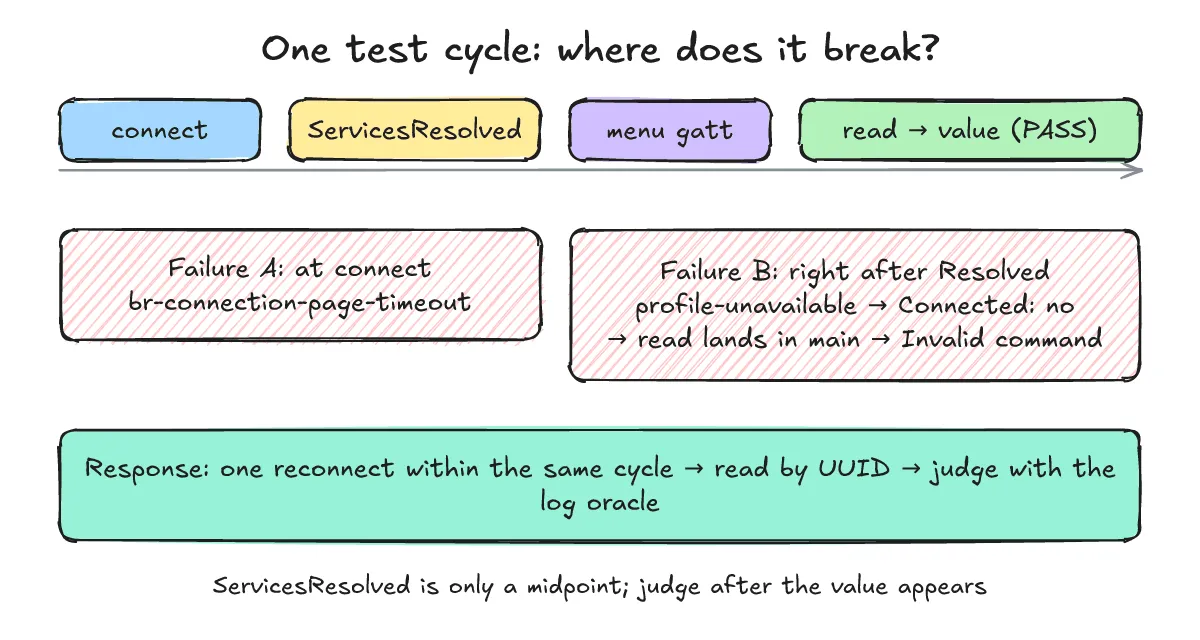
One-line answer: the typical ones are a timeout at the connect step, and the link dropping right after Resolved so that read lands in the main menu.
- Failure A (connect step):
connectfails with an error such asbr-connection-page-timeout. You can see this when the other side stopped advertising or is out of range. - Failure B (right after Resolved): after
ServicesResolved: yes, abr-connection-profile-unavailableerror andConnected: nofollow, and thereadthe script pipes in runs in the main menu, givingInvalid command in menu main: read. Judged by connection alone, this cycle looks like a PASS.
- Both error names are real strings inside BlueZ 5.82
bluetoothdon the machine used for this post:
$ strings /usr/libexec/bluetooth/bluetoothd | grep -E '^br-connection-(page-timeout|profile-unavailable)'
br-connection-page-timeout
br-connection-profile-unavailable- One more lesson: if another BLE feature on the device under test shares the same HCI (Bluetooth controller), pause it before the test so the two don’t interfere with the connection.
How should you retry on failure, and what should you read?
One-line answer: reconnect only once within the same cycle, and read the one characteristic you need by UUID instead of walking the whole tree.
- One reconnect: on a drop, reconnect once within the same cycle; if that fails too, record FAIL and move to the next cycle. Unlimited retries hide real defects and make test time unpredictable.
- Read by UUID: walking the full tree with
list-attributesevery time takes longer and gives the link more chances to drop. Pass the UUID of the characteristic you want (for example Battery Level,00002a19-0000-1000-8000-00805f9b34fb) straight toselect-attributeandread.
How do you pin the verdict logic with unit tests?
One-line answer: save the log strings you’ve actually seen as test inputs, and check every time that the verdict function reaches the same conclusion for each pattern.
- Here’s an example verdict function that judges one cycle from log text. It runs without hardware and returns connection and read results separately.
"""Example: judge one BLE test cycle from bluetoothctl log text.
Connection success and GATT read success are judged separately."""
import re

HEX_LINE = re.compile(r"^\s*([0-9a-f]{2}\s)+", re.I)

def judge(log: str) -> dict:
    lines = log.splitlines()
    connected = any("Connection successful" in l for l in lines)
    resolved = any("ServicesResolved: yes" in l for l in lines)
    read_ok, reason = False, "no read attempted"
    for i, l in enumerate(lines):
        if "Invalid command in menu main: read" in l:
            reason = "read ran in main menu (gatt context lost)"
        if "Connected: no" in l and not read_ok:
            reason = "link dropped before read"
        if "Attempting to read" in l:
            nxt = lines[i + 1] if i + 1 < len(lines) else ""
            if HEX_LINE.match(nxt):
                read_ok, reason = True, "value read"
                break
            reason = "read attempted, no value"
        m = re.search(r"Failed to connect: \S+ (\S+)", l)
        if m:
            reason = m.group(1)
    return {"connected": connected, "resolved": resolved,
            "read_ok": read_ok, "verdict": "PASS" if read_ok else "FAIL",
"reason": reason}- The test inputs are example logs modelled on the failure patterns above (the address and path are examples).
import unittest
from verdict import judge

DEV = "AA:BB:CC:DD:EE:FF"  # example address
PATH = "/org/bluez/hci0/dev_AA_BB_CC_DD_EE_FF/service000a/char000b"  # example path

OK = f"""Attempting to connect to {DEV}
Connection successful
[CHG] Device {DEV} ServicesResolved: yes
Attempting to read {PATH}
  55                                               U"""

DROPPED = f"""Attempting to connect to {DEV}
Connection successful
[CHG] Device {DEV} ServicesResolved: yes
Failed to connect: org.bluez.Error.Failed br-connection-profile-unavailable
[CHG] Device {DEV} Connected: no
Invalid command in menu main: read"""

TIMEOUT = f"""Attempting to connect to {DEV}
Failed to connect: org.bluez.Error.Failed br-connection-page-timeout"""

class T(unittest.TestCase):
    def test_pass_needs_value(self):
        r = judge(OK); self.assertEqual(r["verdict"], "PASS")
    def test_resolved_is_not_pass(self):
        r = judge(DROPPED)
        self.assertTrue(r["resolved"]); self.assertEqual(r["verdict"], "FAIL")
        self.assertIn("main menu", r["reason"])
    def test_page_timeout(self):
        r = judge(TIMEOUT)
        self.assertFalse(r["connected"]); self.assertEqual(r["reason"], "br-connection-page-timeout")

if __name__ == "__main__":
    unittest.main(verbosity=2)
Actual output from running it on Python 3.13.5:
$ python3 test_verdict.py
test_page_timeout (__main__.T.test_page_timeout) ... ok
test_pass_needs_value (__main__.T.test_pass_needs_value) ... ok
test_resolved_is_not_pass (__main__.T.test_resolved_is_not_pass) ... ok

----------------------------------------------------------------------
Ran 3 tests in 0.000s

OK- The key one is
test_resolved_is_not_pass. Once the rule “no value means FAIL, even with ServicesResolved” is pinned in a test, anyone who later loosens the verdict to “connected means PASS” gets caught right away.
References: Bluetooth Core Specification (Vol 3 Part B Base UUID, Part C GAP, Part F ATT, Part G GATT), Bluetooth SIG Assigned Numbers, Battery Service specification, BlueZ documentation (org.bluez.Device and org.bluez.GattCharacteristic D-Bus APIs, bluetoothctl), Nordic nRF Connect app documentation, Python unittest documentation.