Key Takeaway
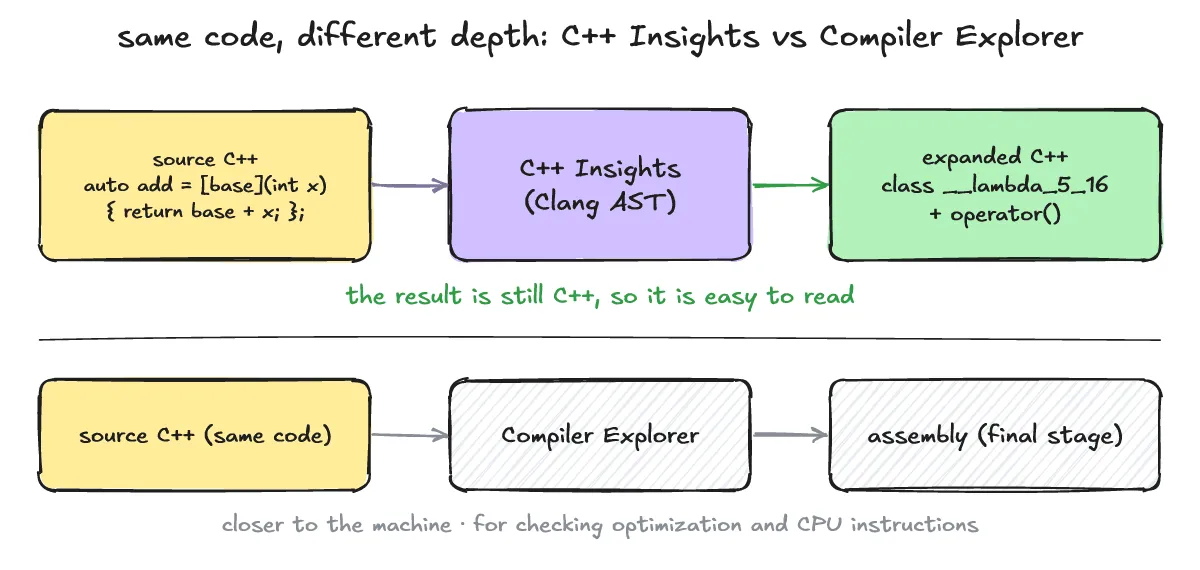
C++ Insights is a Clang-based source-to-source transformation tool that re-expands what the compiler actually does behind your source code back into plain C++. It lets you see which class and operator() a lambda turns into, how a range-for loop is expanded into a begin/end iterator loop, and which constructor gets implicitly called when a struct is copy-initialized — all in the same C++ syntax, not assembly.
Lambdas, range-for, auto deduction, and implicit special member functions are all places where the compiler quietly generates code on your behalf. C++ Insights is useful exactly when you want to see “what the compiler is actually doing” with your own eyes. This post covers what C++ Insights is, basic C++ Insights usage including how to install it and run your first command, and how lambdas, range-for, and implicit constructors actually get expanded, backed by verified examples.
What Is C++ Insights, and How Is It Different From Compiler Explorer?
One-line answer: It’s a Clang-based tool that re-expands your C++ code into “the C++ code the compiler actually understood.”
-
Compiler Explorer (https://godbolt.org) shows the final assembly for your source code, while C++ Insights shows an intermediate form in the same C++ syntax instead of assembly, which makes it easier to read.
-
It’s especially useful for checking what class a lambda actually becomes, how a range-for loop turns into an iterator loop, and exactly where a copy or a move gets called.
-
How implicit special member functions get called during struct copying will be covered separately (「복사 생성자 vs 이동 생성자 차이: 언제 무엇이 호출되나?」, forthcoming).
Install → First Command: Run It on the Web Right Away, or Set It Up Locally?
One-line answer: You can run it instantly on the web (cppinsights.io), or install it locally via Homebrew on macOS or a prebuilt binary on Linux.
-
The fastest option requires no install at all. Go to https://cppinsights.io, paste your code, pick a C++ standard, and the expanded result shows up in the right-hand pane immediately.
-
To install locally, use
brew install cppinsightson macOS (Homebrew formula page: https://formulae.brew.sh/formula/cppinsights, stable 21.1 as of 2026-10-10), or grab a binary archive from the GitHub releases page (https://github.com/andreasfertig/cppinsights/releases) on Linux. To build from source, see the repository itself (https://github.com/andreasfertig/cppinsights). There’s also a separate repo for running it via Docker (https://github.com/andreasfertig/cppinsights-docker), but the actual run command wasn’t verified for this post. -
The first command takes the form
insights <YOUR_CPP_FILE> -- -std=c++17. In this post’s verification environment (release v_21.1,insights-ubuntu-amd64.tar.gz, cpp-insights 21.1 / Clang 21.1.8 Ubuntu build), runninginsights lambda.cpp -- -std=c++17as-is failed withfatal error: 'stddef.h' file not found. I also ranscripts/getinclude.pyas the README suggests, but on this box it emitted extra compiler arguments mixed in with the include paths, so I passed g++‘s include paths directly with-isystem:insights lambda.cpp -- -std=c++17 -isystem/usr/include/c++/14 -isystem/usr/include/x86_64-linux-gnu/c++/14 -isystem/usr/lib/gcc/x86_64-linux-gnu/14/include -isystem/usr/include/x86_64-linux-gnu -isystem/usr/includesucceeded. This local 21.1 binary’s output also differs slightly from the cppinsights.io web result: it shows the lambda class’s constructor explicitly underpublic:, marks thebasemember with a precedingprivate:, and prints/*constexpr */as a comment instead of the keyword itself.
How Do Lambdas, Range-for, and Hidden Constructors Get Expanded?
One-line answer: A lambda is shown as a named class with an operator(), and range-for is shown expanded into a begin/end iterator loop.
- Here’s a lambda expansion example. The code below was written for this post and transformed on cppinsights.io (C++17 option); the README’s official lambda example is at https://cppinsights.io/s/e4e19791.
#include <cstdio>

int main() {
    int base = 10;
    auto add = [base](int x) { return base + x; };
    std::printf("%d\n", add(5));
}
cppinsights.io output (expanded code):
#include <cstdio>

int main()
{
  int base = 10;

  class __lambda_5_16
  {
    public:
    inline constexpr int operator()(int x) const
    {
      return base + x;
    }

    // private:
    int base;
  };

  __lambda_5_16 add = __lambda_5_16{base};
  printf("%d\n", add.operator()(5));
  return 0;
} { return base + x; }, the capture [base] becomes the member int base, the body becomes inline constexpr int operator()(int x) const, the lambda object becomes __lambda_5_16 add = __lambda_5_16{base}, and the call add(5) becomes add.operator()(5)](/_astro/lambda-to-class-en.BsEMoXLO_Z2ugkUA.webp)
- Here’s a range-for loop being expanded into an iterator-based loop. The code below was written for this post and transformed on cppinsights.io (C++17 option); the README’s official range-for example is at https://cppinsights.io/s/0cddd172.
#include <cstdio>
#include <vector>

int main() {
    std::vector<int> v{1, 2, 3};
    for (int x : v) std::printf("%d ", x);
    std::printf("\n");
}
cppinsights.io output (expanded code):
#include <cstdio>
#include <vector>

int main()
{
  std::vector<int, std::allocator<int> > v = std::vector<int, std::allocator<int> >{std::initializer_list<int>{1, 2, 3}, std::allocator<int>()};
  {
    std::vector<int, std::allocator<int> > & __range1 = v;
    __gnu_cxx::__normal_iterator<int *, std::vector<int, std::allocator<int> > > __begin1 = __range1.begin();
    __gnu_cxx::__normal_iterator<int *, std::vector<int, std::allocator<int> > > __end1 = __range1.end();
    for(; operator!=(__begin1, __end1); __begin1.operator++()) {
      int x = __begin1.operator*();
      printf("%d ", x);
    }

  }
  printf("\n");
  return 0;
}- Here’s an auto/decltype deduction being expanded into the actual types. The code below was written for this post and transformed on cppinsights.io (C++17 option); the README’s official auto example is at https://cppinsights.io/s/6c61d601.
#include <vector>

int main() {
    std::vector<int> v{1, 2, 3};
    auto n = v.size();
    auto first = v.front() * 2.0;
    const auto& ref = v;
    return static_cast<int>(n + first + ref.size());
}
cppinsights.io output (expanded code):
#include <vector>

int main()
{
  std::vector<int, std::allocator<int> > v = std::vector<int, std::allocator<int> >{std::initializer_list<int>{1, 2, 3}, std::allocator<int>()};
  unsigned long n = v.size();
  double first = static_cast<double>(v.front()) * 2.0;
  const std::vector<int, std::allocator<int> > & ref = v;
  return static_cast<int>((static_cast<double>(n) + first) + static_cast<double>(ref.size()));
}- Here’s a struct copy-initialization that triggers an implicit copy constructor. This ties directly into the companion post mentioned above (「복사 생성자 vs 이동 생성자 차이: 언제 무엇이 호출되나?」).
#include <string>

struct Point {
    int x;
    std::string name;
};

int main() {
    Point a{1, "a"};
    Point b = a;   // implicit copy constructor
    return b.x;
}
cppinsights.io output (expanded code):
#include <string>

struct Point
{
  int x;
  std::basic_string<char, std::char_traits<char>, std::allocator<char> > name;
  // inline Point(const Point &) noexcept(false) = default;
  // inline ~Point() noexcept = default;
};


int main()
{
  Point a = {1, std::basic_string<char, std::char_traits<char>, std::allocator<char> >("a", std::allocator<char>())};
  Point b = Point(a);
  return b.x;
}- The expanded code shown here reflects Clang’s own interpretation. Internal type names like
__lambda_5_16or__gnu_cxx::__normal_iteratorcan vary with the compiler version and the standard library implementation (libstdc++ here) — that’s a real limitation to keep in mind.
Shall We Check Your Understanding With a Q&A?
Q1. When should I use C++ Insights versus Compiler Explorer?
A1. Use C++ Insights when you want to see how the compiler interpreted your code (an intermediate C++ form), and use Compiler Explorer when you want the final machine code or optimization result.
Q2. What should I do if a local run can’t find the standard headers?
A2. The README points to scripts/getinclude.py to collect your compiler’s include paths. If its output contains extra arguments, as it did here, pass the standard header paths directly with -isystem.
Q3. Does the same code always give the same C++ Insights output?
A3. No. Even this post’s lambda example came out differently on the cppinsights.io web and with the local 21.1 binary (constructor shown, private:, constexpr spelling). It can vary with version, options and standard library. std::move itself is covered in C++ std::move, 복사를 줄이는 이유 (Korean).