Summary
Preparing thoroughly for an online AI exam requires two essential pillars: a systematic study loop and an advance check of your online proctored exam setup. First, explain concepts in simple words, quiz yourself, write your own answer before reading the explanation, and then compare. When delegating tasks to AI, establish a solid 4-step routine: common material, conditions, verification, and format. Second, install the Monito app—accessed via your invited exam link—grant camera and microphone permissions, and prepare a phone stand, Do Not Disturb mode, and chargers. Third, never cheat under any circumstances, and always follow the official guidelines of the exam you are taking.
This post brings together the study routine I developed while preparing for an online assessment along with a general checklist for verifying an online proctored exam environment. Because testing procedures vary across organizations, please use the second half strictly as general preparation guidance.
How did I organize AI fundamentals and study scope?
One-line answer: I studied on weekday evenings, reviewed with short quizzes on my phone during the daily commute, and systematically expanded my study scope starting from AI fundamentals while reinforcing weaker topics.
- Progression of study topics: AI fundamentals → machine learning (supervised, unsupervised, and reinforcement learning; overfitting; train/val/test data splits) → deep learning → Transformers and LLMs → LLM limitations (hallucination) → embeddings and RAG → agents and external tools → AI chips, ethics, and security. I added focused review sessions whenever I encountered weak areas.
- Supervised learning: Learning the mapping relationship between inputs and outputs using datasets that provide ground-truth labels.
- Unsupervised learning: Discovering underlying patterns, structures, or groupings within data without pre-existing labels.
- Reinforcement learning: Learning optimal action strategies through trial and error within an environment to maximize cumulative reward.
- Overfitting: Memorizing training data so rigidly that the model fails to generalize effectively to new, unseen data.
- Data leakage: Information from the test or target dataset inadvertently leaking into the training pipeline, causing evaluation metrics to appear artificially inflated. For instance, applying data preprocessing across the entire dataset before splitting it into training and evaluation sets can cause this issue.
- Core approach to comprehension: Rather than getting bogged down in heavy mathematical formulas, I prioritized intuitive explanations and relatable everyday examples, while examining compute structures from an AI-chip perspective to grasp the overall architecture.
What study loop did I use to really learn the concepts?
One-line answer: I consistently repeated a six-step loop—short explanation → quiz → write own answer first → compare and discuss → hands-on practice → key summary—anchored by one strict rule: never check the answer first.
- Short explanation: Break down the core concept into simple, everyday language.
- Quiz yourself: Tackle questions designed to evaluate whether you truly grasp the underlying principles.
- Write your own answer first: Articulate your reasoning and write out a complete answer before opening the official explanation.
- Compare and discuss: Identify divergences between your answer and the provided solution, analyzing why the differences occurred.
- Hands-on practice: Apply the concept directly in an actual working environment.
- Key summary: Distill what you learned into a few concise bullet points or lines.
The single most crucial habit throughout this cycle was never looking at the answer or explanation beforehand. Committing your own thoughts to writing first is what builds genuine analytical problem-solving ability.
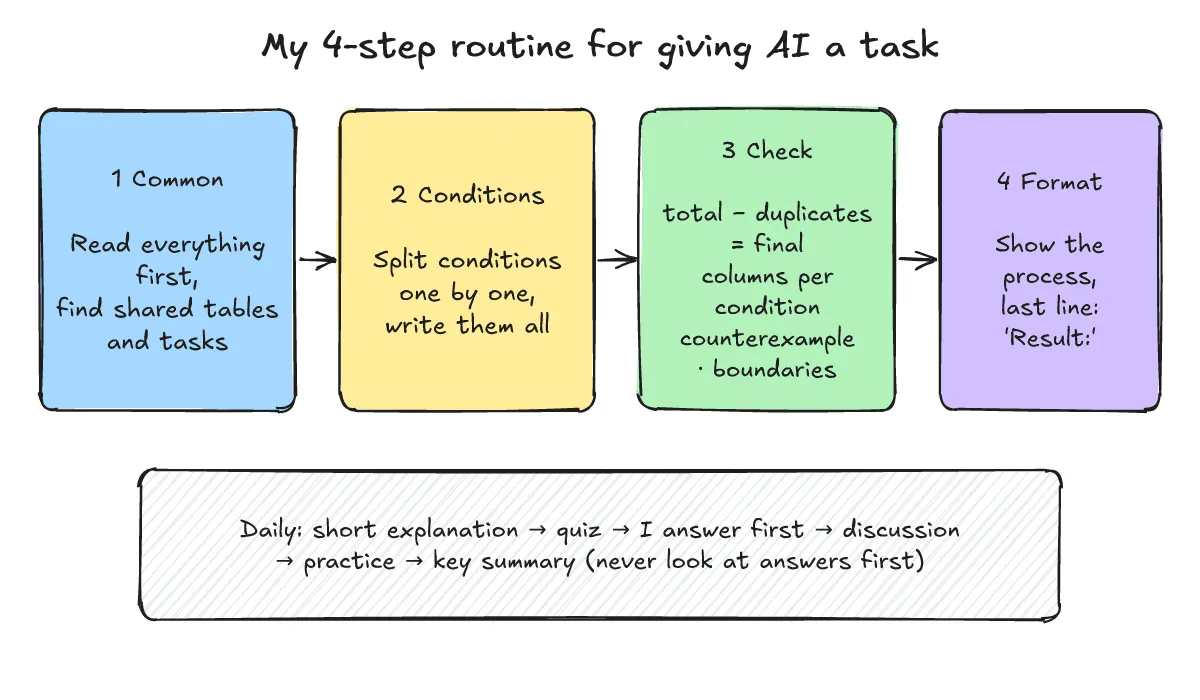
What 4-step routine do I use when giving AI a task?
One-line answer: A structured 4-step routine: Common material (read references thoroughly first) → Conditions (separate complex requirements) → Verification (cross-check counts and request reasoning steps first) → Format (lock the output structure).
- Define scope, criteria, evidence, and format clearly: Specify the exact source material and boundaries (scope), define what constitutes an accurate or completed deliverable (criteria), require explicit citations pointing to where in the material each claim originates (evidence), and designate a single uniform structure for the response (format). If reference materials are provided, review them thoroughly first to identify shared tables and baseline objectives.
- Break conditions into atomic units: Deconstruct compound requirements into discrete individual items and request responses in a tabular format featuring dedicated columns for each condition. This immediately exposes unmet conditions as empty or failing cells. When instructing the model to ignore a specific column, always designate the alternative value or metric to use instead.
- Verify and cross-check: Reconcile row counts (for example: total items − duplicates = final count), request counterexamples, and test boundary conditions. Instead of asking for “the final number only,” instruct the AI to explain its step-by-step reasoning first and output the final result on the last line.
- General operational principles: Never assume that simply attaching files provides sufficient context—explicitly state every condition in written text. Establish duplicate-handling rules upfront, and if dealing with large documents, summarize each section into a standardized table format before merging the datasets.
How did I practise under realistic conditions?
One-line answer: Rather than relying solely on passive reading, I practiced hands-on using the exact device, browser, and desk setup I would use on assessment day, complemented by a self-built practice page.
- Practice in a realistic environment: I conducted exercises on the identical machine, browser, and workspace configuration intended for the actual evaluation. Passive reading frequently conceals operational gaps that only active hands-on execution reveals.
- Personal practice web page: To drill the key operational habits described above (summarizing materials, cross-checking conditions, and organizing tabular outputs), I created a small personal web page containing fictional practice scenarios I authored myself. This was solely an independent practice tool developed to cultivate general competence, not a recreation of any specific exam. I am not linking it in this post.
How should you set up the Monito proctoring app in advance?
One-line answer: Install the designated app in advance via your invited exam link, grant camera and microphone permissions, and ensure the app remains actively running until the exam concludes.
- Service overview: Monito is an online exam proctoring service. According to its official website, it monitors the test taker’s front view, side view, and computer screen simultaneously through screen sharing, a webcam, and a mobile smartphone. The platform also notes that exam sessions are recorded and archived.
- Access procedure: Because the application is strictly designed for invited participants, access is granted exclusively through your designated exam link. According to the App Store listing for the Monito app, the setup steps are:
- Open your invited exam link on your computer and scan the displayed QR code with your smartphone to connect.
- Follow the step-by-step on-screen setup instructions before the exam begins.
- Keep the application actively running on your smartphone without closing it until the entire exam concludes.
- Required permissions and system specifications: Camera access (to monitor the test taker) and microphone access (for audio monitoring during recording) are required. The App Store notes that iOS 16.4 or later is required.
- Essential verification: Testing and proctoring workflows differ across organizations. Be sure to consult the official guidelines provided by your specific exam organizer for precise installation and testing instructions.
How should you check your smartphone setup and hardware environment?
One-line answer: Secure your smartphone on a sturdy stand, enable Do Not Disturb mode, silence non-essential alerts, plug in all chargers, and on your PC update the designated browser and close extraneous software.
- Smartphone stand: In accordance with App Store guidelines, prepare a stable phone stand or mount to keep your smartphone firmly in position throughout the session.
- Do Not Disturb mode: Incoming phone calls or text messages can interrupt video proctoring, so make sure to turn on Do Not Disturb mode beforehand.
- Silence non-essential notifications: Emergency alerts or disaster broadcasts can disrupt video monitoring streams; the listing recommends disabling non-critical notification categories other than essential alerts.
- Connect charging cables: Continuous video recording causes rapid battery consumption, making it essential to connect your phone to a charger prior to the session.
- PC verification (general guidance): Note that this is general operational advice rather than official Monito documentation. Update the web browser specified by your exam guide to the latest version, close all background applications unrelated to the exam, verify camera, microphone, and screen-sharing permissions, and keep your laptop plugged into wall power.
- Network stability (general guidance): Establish a reliable wired Ethernet connection or a stable Wi-Fi network. Prepare backup alternatives, such as a mobile hotspot, only if explicitly permitted by the exam guidelines.
- Pre-exam environment check: If the exam administrator provides an advance system testing window, participate without fail to validate your hardware and network setup.
What about smart glasses, and what is the full checklist?
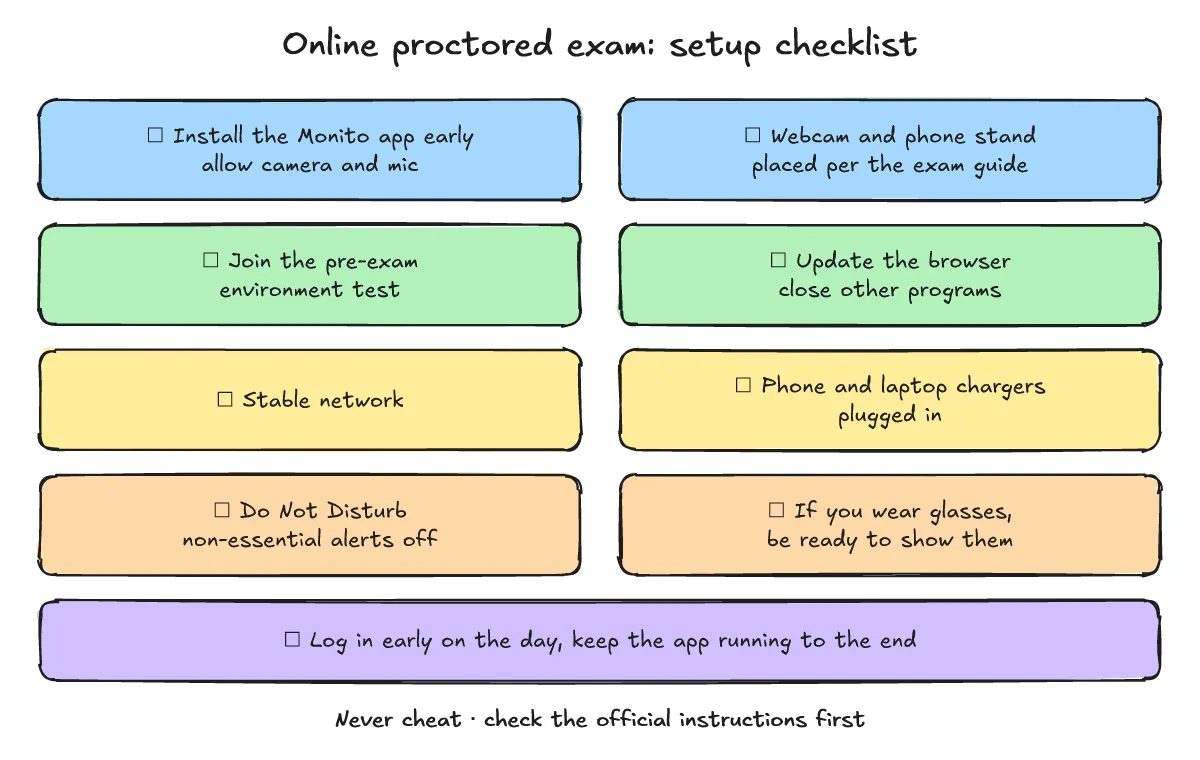
One-line answer: If you wear glasses, be prepared to present them to the camera upon request, and systematically review the 9 preparation checklist items below before exam day.
There has been a recent Newsis report covering instances where test takers using smart glasses were caught cheating during in-person exams in Korea (an on-site exam venue incident). While that case took place at an in-person venue rather than online, online proctored exams may also include eyewear inspection protocols, so be prepared to show your glasses to the camera if requested.
- Install the Monito app from the official application store in advance and grant camera and microphone permissions (iOS 16.4 or later per the App Store).
- Position your webcam and smartphone stand properly, following your own exam’s instructions for placement.
- Participate in the pre-exam environment test if one is made available by the organizers.
- Browser and PC: Update the browser specified by your exam guidelines, close unrelated background programs, and verify screen-sharing authorization.
- Network: Secure a dependable connection and prepare a verified backup plan if permitted under testing regulations.
- Power management: Connect reliable chargers to both your smartphone (as recommended by the App Store) and your laptop.
- Smartphone notification controls: Turn on Do Not Disturb mode and disable non-essential notification types.
- Eyewear check: If you wear glasses, be prepared to hold them up to the camera if you are asked.
- Exam day readiness: Log in well ahead of time and ensure the application remains open and active until the exam finishes.
Why do honesty and the official instructions matter most?
One-line answer: Any attempt to compromise exam integrity can result in disqualification and severe consequences; maintaining strict test integrity and following official guidelines is your safest preparation strategy.
- Never attempt to cheat: Any form of cheating or unauthorized assistance can trigger immediate disqualification, exam cancellation, and severe disciplinary consequences.
- Review your environment thoroughly: Verifying your devices, mount positioning, network connection, and notification settings ahead of time prevents technical errors and avoids unnecessary suspicion.
- Always adhere to official instructions first: Because proctoring rules, technical constraints, and monitoring setups differ across institutions, always consult and follow the official testing guidelines provided by your exam administrators.