Summary
SDR (software-defined radio) moves signal demodulation and decoding from dedicated hardware circuitry into software running on a PC (Antenna → Tuner → ADC → IQ samples → PC software demodulation/decoding). Originating from mass-produced RTL2832U-based DVB-T TV tuner dongles that expose raw I/Q data directly, an RTL-SDR paired with rtl_433 can receive and decode 433.92 MHz ISM-band sensor signals—such as temperature and humidity sensors—into JSON or human-readable logs. The workflow follows three steps: (1) unload or blacklist the conflicting kernel DVB-T driver (dvb_usb_rtl28xxu), (2) verify device detection with rtl_test, and (3) run rtl_433 -f 433.92M -F json for live reception (or test decoding with -r on a public sample recording).
What is SDR, and how does it differ from a hardware radio?
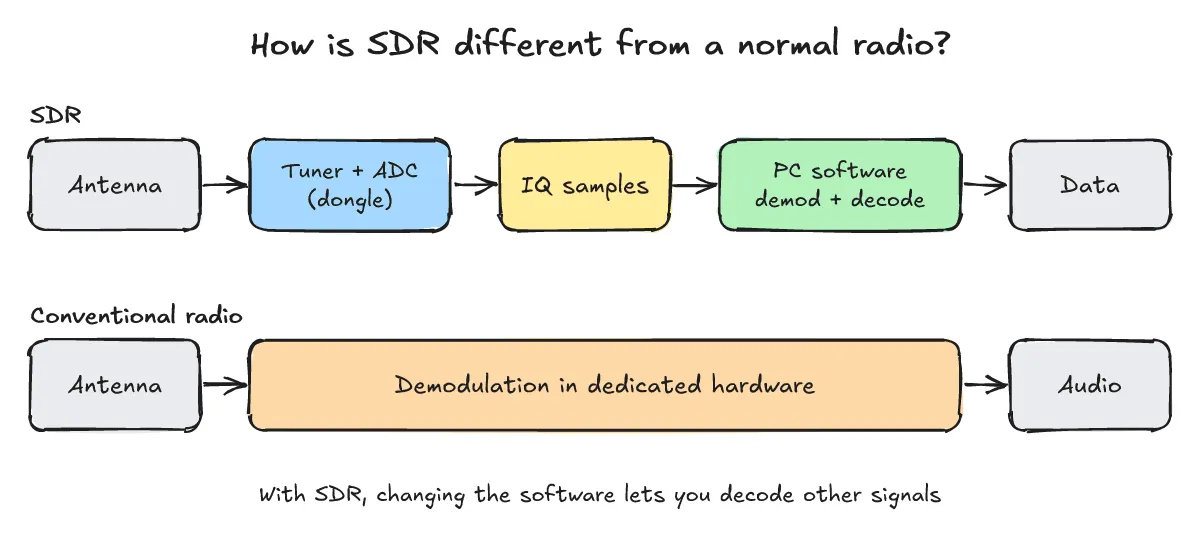
One-line answer: While a conventional hardware radio demodulates signals in dedicated circuitry, an SDR sends IQ samples from the antenna, tuner, and ADC to a PC so demodulation and decoding happen in software.
- Signal flow comparison: Traditional radios rely on fixed hardware circuits built for specific frequencies and modulation schemes. An SDR follows the path Antenna → Tuner → ADC (Analog-to-Digital Converter) → IQ samples → software demodulation/decoding on the PC, allowing you to receive and decode different wireless protocols simply by changing the software.
- Recent wideband SDR example: Highlighted in a recent Hacker News thread, the w1700k-sdr project README explains that its custom firmware turns a Gemtek W1700K Wi-Fi 7 router into a wideband software-defined receiver, where the router’s MediaTek MT7996 radio captures raw 14-bit IQ samples at up to 320 Msps and streams them over 10 GbE.
What do you need to get started with RTL-SDR?
One-line answer: You need an RTL2832U-based RTL-SDR dongle, an antenna, a Linux machine with the rtl-sdr and rtl-433 packages installed, and the conflicting dvb_usb_rtl28xxu kernel driver unloaded.
- Origin and frequency range of RTL-SDR: According to the official About RTL-SDR page, RTL-SDR originated from mass-produced DVB-T TV tuner dongles built on the RTL2832U chipset after developers found that raw I/Q samples could be accessed directly, turning the dongle into a wideband SDR. The supported frequency range depends on the tuner model; for example, the R820T, R820T2, and RTL-SDR Blog V4 cover 24 – 1766 MHz according to the official site.
- Hardware and Linux packages: Prepare an RTL-SDR USB dongle, an antenna, and a Linux PC or Raspberry Pi. On Debian 13, both
rtl-sdrandrtl-433can be installed directly viaapt. For cross-compiling Raspberry Pi binaries on a separate host PC, refer to What Is Cross-Compiling? Building with ARM gcc and Running It in QEMU, Step by Step. - Resolving the kernel DVB-T driver conflict: As noted in the RTL-SDR Quick Start Guide, the Linux kernel’s default DVB-T driver (
dvb_usb_rtl28xxu) can claim the dongle first and block SDR utilities from opening it.- Temporary unload: run
sudo rmmod dvb_usb_rtl28xxu. - Permanent fix: add
blacklist dvb_usb_rtl28xxuto a configuration file in/etc/modprobe.d/.
- Temporary unload: run
What are the steps to receive and decode 433 MHz sensor signals?
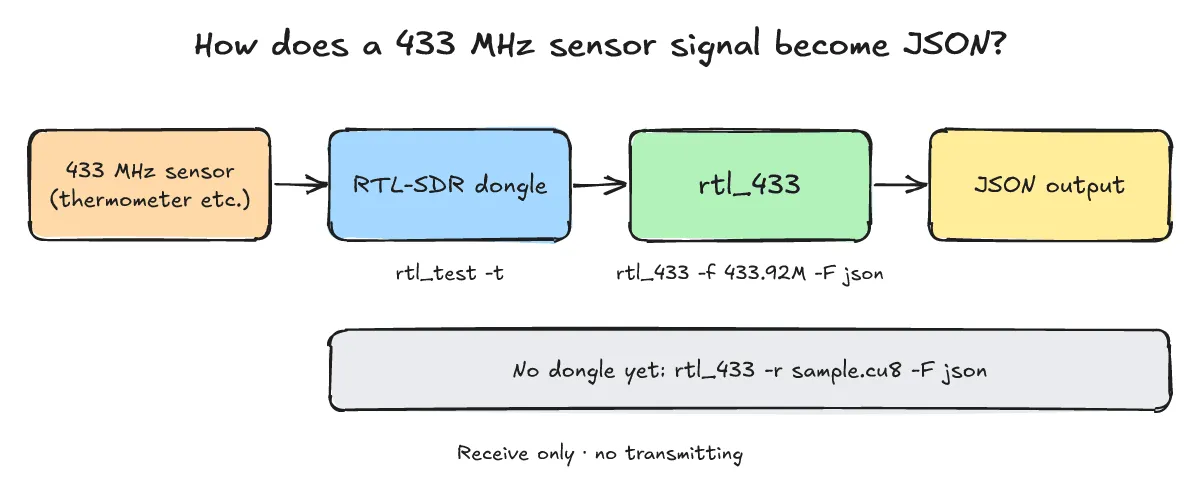
One-line answer: Check device detection with rtl_test -t, verify decoding against a public sample file using rtl_433 -r, and run rtl_433 -f 433.92M -F json when a dongle is attached.
- What
rtl_433does and its key flags: According to the rtl_433 GitHub README,rtl_433is “a generic data receiver, mainly for the 433.92 MHz, 868 MHz (SRD), 315 MHz, 345 MHz, and 915 MHz ISM bands”.-f <frequency>: sets the receive frequency (defaults to433920000Hz).-F json|csv|kv|log...: selects the output format.-r <file>: reads and decodes recorded samples from a file instead of live hardware.
-
Step 1 — Check device detection (output with no dongle attached): Below is the actual output on a Debian 13 system with the
rtl-sdrandrtl-433apt packages installed (rtl_433 version 25.02 (2025-02-19)) and no dongle attached. You will see this exact message when the dongle is unplugged or claimed by the kernel DVB driver.Actual output (Debian 13, apt packages
rtl-sdrandrtl-433, no dongle attached)$ rtl_test -t No supported devices found. $ rtl_433 -f 433.92M -F json -F log -T 3 rtl_433 version 25.02 (2025-02-19) inputs file rtl_tcp RTL-SDR SoapySDR SDR: No supported devices found. -
Step 2 — Verify decoding against a public sample recording: The output below is not live over-the-air reception; it is an actual decode of a public sample recording from the
rtl_433test repository (rtl_433_tests on GitHub, specificallytests/nexus/03/g027_433.92M_250k.cu8, which is a recording of a Nexus-type temperature and humidity sensor captured at 433.92 MHz with a 250 kHz sample rate).Actual output — decoding a public sample recording from the
rtl_433test repo (tests/nexus/03/g027_433.92M_250k.cu8), not live reception$ rtl_433 -r g027_433.92M_250k.cu8 -F json {"time" : "@0.084672s", "model" : "Nexus-TH", "id" : 201, "channel" : 3, "battery_ok" : 1, "temperature_C" : 29.400, "humidity" : 30} $ rtl_433 -r g027_433.92M_250k.cu8 time : @0.084672s model : Nexus-TH House Code: 201 Channel : 3 Battery : 1 Temperature: 29.40 C Humidity : 30 % -
Step 3 — Command for live reception with a dongle connected: With an RTL-SDR dongle connected, run the following command to receive 433.92 MHz signals live and output them as JSON (no live output shown).
Command you would run with a dongle attached
rtl_433 -f 433.92M -F json
What should you check when signals are not received?
One-line answer: Check whether the kernel DVB module claimed the device, verify the frequency (-f) and gain settings, adjust antenna placement, and follow local receive-only regulations.
- Device claimed by kernel module: If
rtl_testorrtl_433reportsNo supported devices found., verify the USB connection and check whetherdvb_usb_rtl28xxuhas claimed the dongle; unload it withsudo rmmod dvb_usb_rtl28xxuor blacklist it in/etc/modprobe.d/. - Frequency and gain settings: Confirm that the sensor’s ISM band matches the
-fparameter (rtl_433defaults to433920000Hz / 433.92 MHz and also supports the 868 MHz, 315 MHz, 345 MHz, and 915 MHz ISM bands) and check the tuner gain settings. - Antenna placement: Reposition the antenna and adjust its orientation relative to the sensor.
- Local radio regulations: Check local radio rules and use the setup for receive only—this post covers no transmitting.
What do SDR beginners often ask?
Q1. Why do `rtl_test -t` or `rtl_433` print `No supported devices found.`?
This happens when no RTL-SDR dongle is plugged in or when the Linux kernel’s DVB-T driver (dvb_usb_rtl28xxu) has claimed the hardware. Unload it temporarily with sudo rmmod dvb_usb_rtl28xxu, or blacklist it permanently by adding blacklist dvb_usb_rtl28xxu to a file in /etc/modprobe.d/.
Q2. What frequency range can an RTL-SDR dongle receive?
The frequency range depends on the tuner model. For example, the R820T, R820T2, and RTL-SDR Blog V4 cover 24 – 1766 MHz according to the official site.
Q3. Can I test `rtl_433` decoding without an RTL-SDR dongle attached?
Yes. By downloading a public sample recording from the rtl_433_tests repository (such as tests/nexus/03/g027_433.92M_250k.cu8) and running rtl_433 -r g027_433.92M_250k.cu8 -F json, you can verify JSON and log decoding without physical hardware.
Q4. Does `rtl_433` support bands other than 433.92 MHz?
According to the rtl_433 README, the default receive frequency is 433920000 Hz (433.92 MHz), and it mainly supports the 433.92 MHz, 868 MHz (SRD), 315 MHz, 345 MHz, and 915 MHz ISM bands via the -f flag.