A system call is the entry path a user program uses to request work from the kernel when it cannot touch hardware or kernel memory directly. Based on the Linux manual pages, official kernel documentation, and examples run in this post’s environment (x86-64 Linux, gcc 14.2, strace 6.13), this post traces how everyday calls such as read(), write(), and ioctl() cross into the kernel through architecture instructions (svc #0, syscall), reach Virtual File System (VFS) file_operations handlers, and copy data safely between user space and kernel space with copy_from_user() and copy_to_user().
Key Takeaways
User programs normally call glibc wrapper functions such as write() and read()—or the generic syscall(2) library function—which place the system call number and arguments into registers and execute the architecture’s transition instruction (svc #0 on arm64, syscall on x86-64). When plain byte-stream reads and writes are not enough, ioctl() manipulates underlying device parameters of special files using an open file descriptor, a 32-bit operation code (encoded with _IO, _IOR, _IOW, or _IOWR), and a memory pointer. Inside the kernel, VFS dispatches the call through struct file_operations callbacks (read, write, unlocked_ioctl, compat_ioctl), and kernel code copies user-space memory safely with copy_from_user() and copy_to_user() instead of dereferencing user pointers directly.
What is a system call and why is it needed?
One-line answer: Because a user program cannot access hardware or kernel memory directly, it requests operations from the kernel through a defined entry path called a system call.
User-space programs on Linux run in an unprivileged mode and cannot directly access hardware resources, pipes, special files, or kernel memory. Whenever a program needs to read or write data or control a device, it invokes a system call to transition into kernel mode and let the kernel perform the operation on its behalf.
Relationship between glibc wrapper functions and syscall(2)
As described in the syscall(2) manual page, programs normally call glibc wrapper functions such as write() or read(). Those wrappers load the system call number and arguments into the architecture’s designated registers and issue the instruction that transitions to kernel mode. Meanwhile, syscall(2) is a small library function that invokes the system call whose assembly interface has the specified number with the specified arguments.
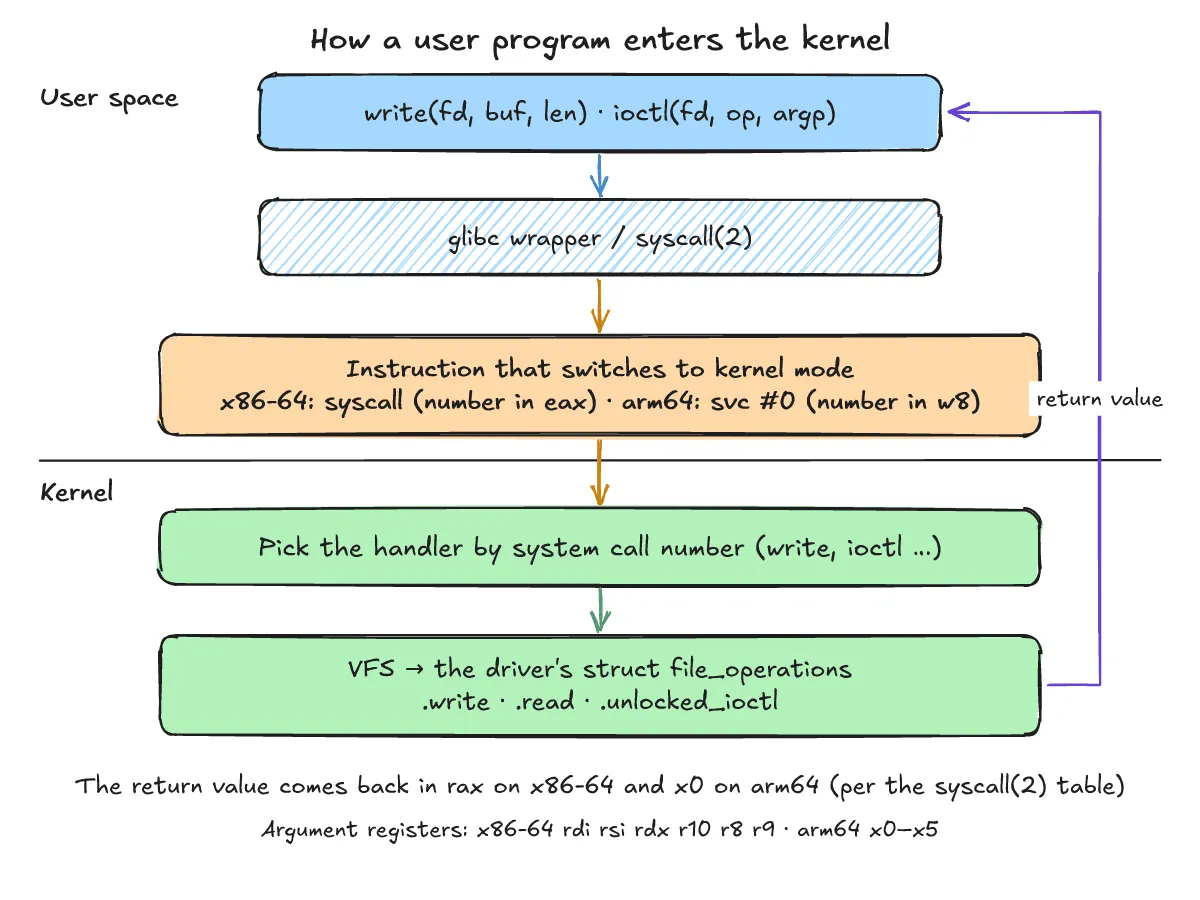
Which instructions and registers does the CPU use to enter kernel mode?
One-line answer: Each architecture defines its own instruction and register convention; arm64 uses svc #0 with w8, and x86-64 uses the syscall instruction with eax holding the system call number.
The “Architecture calling conventions” section of syscall(2) states: “Every architecture has its own way of invoking and passing arguments to the kernel.” Its first table lists the instruction used to transition to kernel mode, the register used for the system call number, and the return registers; its second table lists the registers used to pass the system call arguments.
Architecture calling conventions table from syscall(2)
The table below reproduces the exact arm64 and x86-64 rows from the two tables in syscall(2). Note that arm64 (svc #0) was not run for this post and is described solely from the syscall(2) table.
| Arch | Instruction | System call # | Return value | Error | Args |
|---|---|---|---|---|---|
| arm64 | svc #0 | w8 | x0, x1 | - | x0 x1 x2 x3 x4 x5 |
| x86-64 | syscall | eax | rax, rdx | - | rdi rsi rdx r10 r8 r9 |
Invoking the syscall instruction directly on x86-64
On x86-64, the system call number for write is 1, placed in rax (eax), while the first three arguments go into rdi, rsi, and rdx. The following program, raw_syscall_x86_64.c, was run in this post’s environment (x86-64 Linux, gcc 14.2, strace 6.13) to invoke write(2) directly with the syscall instruction:
/* x86-64 only: invoke write(2) with the syscall instruction directly */
int main(void) {
    const char msg[] = "asm\n";
    long ret;
    __asm__ volatile ("syscall"
                      : "=a"(ret)
                      : "a"(1L), "D"(1L), "S"(msg), "d"(4L)   /* rax=1 (write), rdi=fd, rsi=buf, rdx=len */
                      : "rcx", "r11", "memory");
    return ret == 4 ? 0 : 1;
}
Building with gcc -O0 -Wall -o raw_syscall_x86_64 raw_syscall_x86_64.c produces no warnings. Tracing the binary with strace -e trace=write ./raw_syscall_x86_64 > /dev/null prints the following on stderr:
write(1, "asm\n", 4)                    = 4
+++ exited with 0 +++
Even without calling the glibc write() wrapper, the inline syscall instruction with rax=1 appears in strace as write(1, "asm\n", 4) = 4 because the kernel only sees the system call number and registers.
How do glibc wrappers and syscall(2) calls look under strace?
One-line answer: Because the kernel only checks the system call number and registers, both the write() wrapper and syscall(SYS_write, ...) appear as the exact same write system call in strace.
We can compare a standard glibc write() wrapper call with a generic syscall(2) call side by side. For a practical introduction to tracing system calls, see strace: how to see which system calls a process makes (Korean).
Running hello_write.c and comparing strace output
The program hello_write.c calls the glibc write() wrapper first and syscall(SYS_write, ...) second:
#include <unistd.h>
#include <sys/syscall.h>

int main(void) {
    write(1, "hello\n", 6);                 /* glibc wrapper */
    syscall(SYS_write, 1, "raw\n", 4);      /* generic syscall(2) */
    return 0;
}
When built with gcc -O0 -Wall -o hello_write hello_write.c (no warnings) and run in this post’s environment (x86-64 Linux, gcc 14.2, strace 6.13), ./hello_write produces:
hello
raw
Running strace -e trace=write ./hello_write > /dev/null produces the following on stderr:
write(1, "hello\n", 6)                  = 6
write(1, "raw\n", 4)                    = 4
+++ exited with 0 +++
Both the glibc write() call and syscall(SYS_write, ...) appear as the same write system call in strace.
How does ioctl work when read and write are not enough?
One-line answer: ioctl() takes an open file descriptor, a 32-bit command number, and a memory pointer to manipulate underlying device parameters or exchange status values on special files.
As stated in ioctl(2): “The ioctl() system call manipulates the underlying device parameters of special files.” Its first argument fd must be an open file descriptor, the second argument is a device-dependent operation code, and the third argument is an untyped pointer to memory.
ioctl command number encoding and _IO, _IOR, _IOW, _IOWR macros
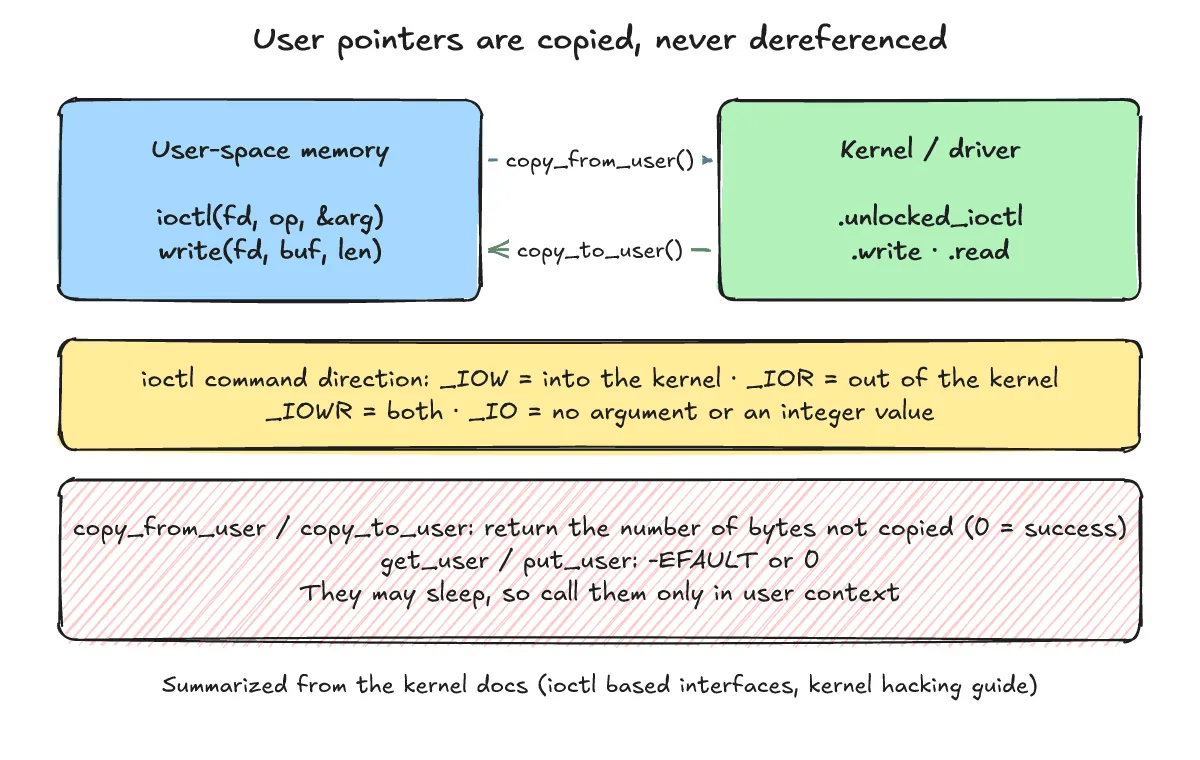
According to ioctl(2) and the Linux kernel documentation (ioctl based interfaces), the command number passed as the second argument may be any 32-bit number, but it should be constructed with the macros in <asm/ioctl.h>, which encode the in/out direction, argument size, an 8-bit type, and an 8-bit serial number:
_IO: command with no argument or an integer value._IOW: pointer to data passed into the kernel._IOR: pointer to data read out of the kernel._IOWR: pointer to data passed both into and out of the kernel.
Checking waiting bytes in a pipe with FIONREAD
The program fionread_pipe.c writes 5 bytes ("abcde") into a pipe and calls ioctl() with FIONREAD and &n to query how many bytes are waiting to be read:
#include <stdio.h>
#include <unistd.h>
#include <sys/ioctl.h>

int main(void) {
    int fds[2], n = 0;
    pipe(fds);
    write(fds[1], "abcde", 5);
    ioctl(fds[0], FIONREAD, &n);            /* bytes waiting in the pipe */
    printf("FIONREAD = %d\n", n);
    return 0;
}
Built with gcc -O0 -Wall -o fionread_pipe fionread_pipe.c (no warnings), running ./fionread_pipe outputs:
FIONREAD = 5Tracing the same binary with strace -e trace=pipe,pipe2,write,ioctl ./fionread_pipe > /dev/null prints the following on stderr:
pipe2([3, 4], 0)                        = 0
write(4, "abcde", 5)                    = 5
ioctl(3, FIONREAD, [5])                 = 0
ioctl(1, TCGETS, 0x7fff35244c60)        = -1 ENOTTY (Inappropriate ioctl for device)
write(1, "FIONREAD = 5\n", 13)          = 13
+++ exited with 0 +++
Here, FIONREAD on the pipe returned 5, matching the 5 bytes written. The bracketed [5] in strace is the value the kernel wrote back into the user pointer &n. The ioctl(1, TCGETS, ...) = -1 ENOTTY line is the C stdio library checking whether stdout is a terminal when stdout was redirected to /dev/null.
How does a system call inside the kernel reach the driver function?
One-line answer: The Virtual File System (VFS) looks up the struct file_operations table associated with the file descriptor and invokes handlers such as read, write, unlocked_ioctl, or compat_ioctl.
When a user program calls read(), write(), or ioctl() on an open file descriptor, the kernel routes the request through the Virtual File System (VFS) layer to the struct file_operations function table attached to that open file. No kernel module was built or run for this post; this path is explained from the official kernel VFS documentation (Overview of the Linux Virtual File System).
Roles of key callbacks in struct file_operations
The VFS documentation defines these members of struct file_operations as follows:
read: called byread(2)and related system calls.write: called bywrite(2)and related system calls.unlocked_ioctl: called by theioctl(2)system call.compat_ioctl: called by theioctl(2)system call when 32-bit system calls are used on 64-bit kernels.
Waiting inside the driver when data is not ready
What happens when a read() call enters the driver path and needs to block until data arrives is covered in “Are blocking/non-blocking and sync/async the same thing? Wait queues, O_NONBLOCK, epoll and io_uring”.
Why does the kernel use copy_from_user instead of dereferencing a user-space pointer directly?
One-line answer: A pointer into user space must never be dereferenced directly; because these operations may sleep implicitly, the kernel copies data in user context using routines such as copy_from_user() and copy_to_user().
Calls like write() and ioctl() pass user-space pointers into the kernel. In the Linux kernel documentation (Unreliable Guide To Hacking The Linux Kernel), the section on copy_to_user() / copy_from_user() / get_user() / put_user() (include/linux/uaccess.h, marked [SLEEPS]) states: “A pointer into userspace should never be simply dereferenced: data should be copied using these routines.” No kernel code was run for this post; these rules are summarized directly from the kernel documentation.
Return value rules of copy_from_user, copy_to_user, get_user, and put_user
The kernel hacking guide specifies the return values for single-value and bulk copy routines:
get_user()/put_user(): return-EFAULTon error or0on success.copy_from_user()/copy_to_user(): copy an arbitrary amount of data and “return the amount of uncopied data (ie. 0 still means success)”.
User context requirement and sleeping behavior
The guide also notes: “The functions may sleep implicitly. This should never be called outside user context.” Because these functions can sleep, you must be careful in sections such as code holding a spinlock; for more on how spinlocks and mutexes differ, see Spinlocks vs mutexes (Korean).
What are the frequently asked questions?
One-line answer: Below are three common questions covering system call invocation methods, user-pointer copy rules, and interpreting strace output.
Is there any difference to the kernel between glibc's write() and syscall(SYS_write, ...)?
No. As shown in the `strace` outputs for `hello_write.c` and `raw_syscall_x86_64.c`, the kernel only sees the system call number and registers, so the glibc `write()` wrapper, `syscall(SYS_write, ...)`, and the inline `syscall` instruction with `rax=1` all appear as the same `write` system call.Why must kernel code never directly dereference a user-space pointer?
As documented in the Linux kernel hacking guide (`include/linux/uaccess.h`), a pointer into user space should never be simply dereferenced; data must be copied in user context using `copy_from_user()`, `copy_to_user()`, `get_user()`, or `put_user()`, which may sleep implicitly. For `copy_from_user()` and `copy_to_user()`, the return value is the amount of uncopied data, so `0` means success.What does [5] mean in the strace output ioctl(3, FIONREAD, [5])?
The `[5]` in `strace` is the value that the kernel wrote back into the user pointer (`&n`) passed as the third argument to `ioctl()`, showing the 5 bytes waiting in the pipe.What related posts are worth reading?
One-line answer: Below are related posts on tracing system calls, kernel synchronization basics, and blocking I/O flows.
- strace: how to see which system calls a process makes (Korean)
- Spinlocks vs mutexes (Korean)
- “Are blocking/non-blocking and sync/async the same thing? Wait queues, O_NONBLOCK, epoll and io_uring”
What are the sources?
One-line answer: Below are the Linux manual pages and official kernel documentation referenced in this post.
- syscall(2) — Linux manual page (checked 2026-11-04)
- ioctl(2) — Linux manual page (checked 2026-11-04)
- Linux kernel docs: ioctl based interfaces (checked 2026-11-04)
- Linux kernel docs: Overview of the Linux Virtual File System (checked 2026-11-04)
- Linux kernel docs: Unreliable Guide To Hacking The Linux Kernel (checked 2026-11-04)