At a glance
When you look for a cheaper way to use YouTube Premium, the first things to check are the official price and the risks. The current official rate is ₩14,900/month for an individual plan (as of publication date), and Premium Lite is ₩8,500/month (as of publication date). Signing up from another country through a VPN can lead to a declined payment or a canceled subscription, so if you want to lower the monthly cost, it is worth also looking at a practical alternative such as a shared subscription.
This post contains affiliate links. If you sign up through a link, I may earn a commission, and there is no extra cost to you.
You can check how the shared-subscription platform works and which services it supports in the shared-subscription marketplace (Doloffer) roundup.
What does YouTube Premium officially cost right now?
Before looking for a cheaper way to use YouTube Premium, check the official price that everything else is measured against. On the YouTube Premium official page, the individual plan is ₩14,900/month (as of publication date), and the Premium Lite individual plan is ₩8,500/month (as of publication date).
Prices can change at any time, so always confirm the exact amount on the official page. This post does not cover a detailed price table for family or student plans, or prices by payment method.
For a plan-by-plan comparison, see Which YouTube Premium plan should you pick?.
For ad removal, offline downloads, and the other main features, see YouTube Premium: from ad-free features to discounts.
Because it is a fixed monthly cost, many people look for a cheaper way to use YouTube Premium or for a discount path that goes around the official price.
How do people try to sign up from another country with a VPN, and what actually gets in the way?
A widely known approach is to connect with a VPN so the IP looks like another country, then try to subscribe at that country’s price. In practice, payment limits and the terms can cause the following problems.
The payment can be declined. A Google payments profile is tied to one country, and you cannot change the country of an existing profile. If the country you are trying to join does not match the country of your payments profile or payment method, the payment can be blocked. If the card issuer does not allow foreign or online payments, the issuer can decline the charge as well (Google payments troubleshooting).
The subscription can be canceled. According to YouTube’s official Help Center, you must show your country accurately when you join a plan and while you use it. If you misrepresent your location (including by using a VPN) or try to get around access and availability restrictions, the subscription can be canceled, and you should mainly use the membership in the country where you subscribed.
It can violate the terms. The geographic-restriction clause in the YouTube paid service terms says you agree not to misstate your country of residence and not to try to bypass geographic restrictions.
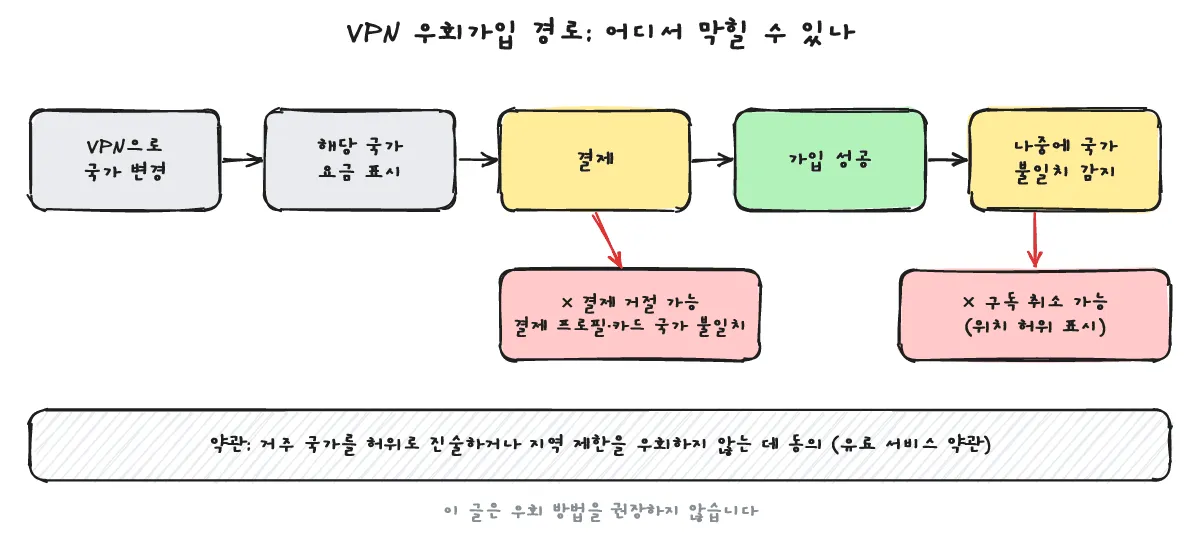
Because of limits like blocked payments and terms violations, you should understand these risks before trying a workaround signup.
If that is too hard, what is the simpler alternative?
If the risk of a declined payment or a canceled subscription from a VPN signup is too much, you can look at a shared-subscription marketplace, where several people use an account together, as an alternative.
A shared subscription is not a solo account in your own name. Several people split the account slots and use them together. The advantage is a lower cost than the regular price, without a complicated workaround or a foreign payment. Because the account is shared, though, the terms of use and the supported products can change depending on how the service is run.
Specific prices and discount rates change often by product and by time, so you should check on that site whether a YouTube Premium product is offered right now and what the detailed terms are.
How shared subscriptions are run, and the discount paths, are covered in YouTube Premium shared subscriptions, from the official price to discount paths.
FAQ: What do people ask when they want YouTube Premium for less?
Can anyone use the free trial?
Whether you qualify for a free trial, and the conditions that apply, can differ based on the account’s history, so check the official page yourself.
Can several people split a family plan?
Under YouTube’s official policy, every member of a family membership must live at the same residence as the family manager.
Should you choose Premium Lite or regular Premium?
The two plans include different features, so choose based on the features you actually use. For a detailed comparison, see Which YouTube Premium plan should you pick?.
Is a shared subscription safe?
It can cost less than an official solo plan, but it is not a solo account in your own name. Several people use it together. Terms and availability can differ by platform and by product, and because the account is shared, the service policy can also limit your use. Before you sign up, check that site for current support and the things to watch out for.
For the specific how-to and supported services of the shared-subscription platform, see the shared-subscription marketplace (Doloffer) roundup.