For a while, I practiced answering written questions by attaching multiple files—such as policy PDFs, master tables, and raw logs—to an LLM chat. These were questions that required judging whether conditions were met, counting cases, and calculating amounts.
At first, I thought the AI would handle everything well on its own. Once I actually tried it, what determined the result wasn’t the AI’s capability. It was what and how I instructed it to do. There were times when the calculation was right but I got it wrong because I left out a single condition, times when I got it wrong by misreading a single row in a long table, and times when I asked it to double-check, only for it to simply add up the exact same numbers again.
This post is the approach I organized through making those mistakes. I hope it helps those practicing practical AI application problems.
Contents
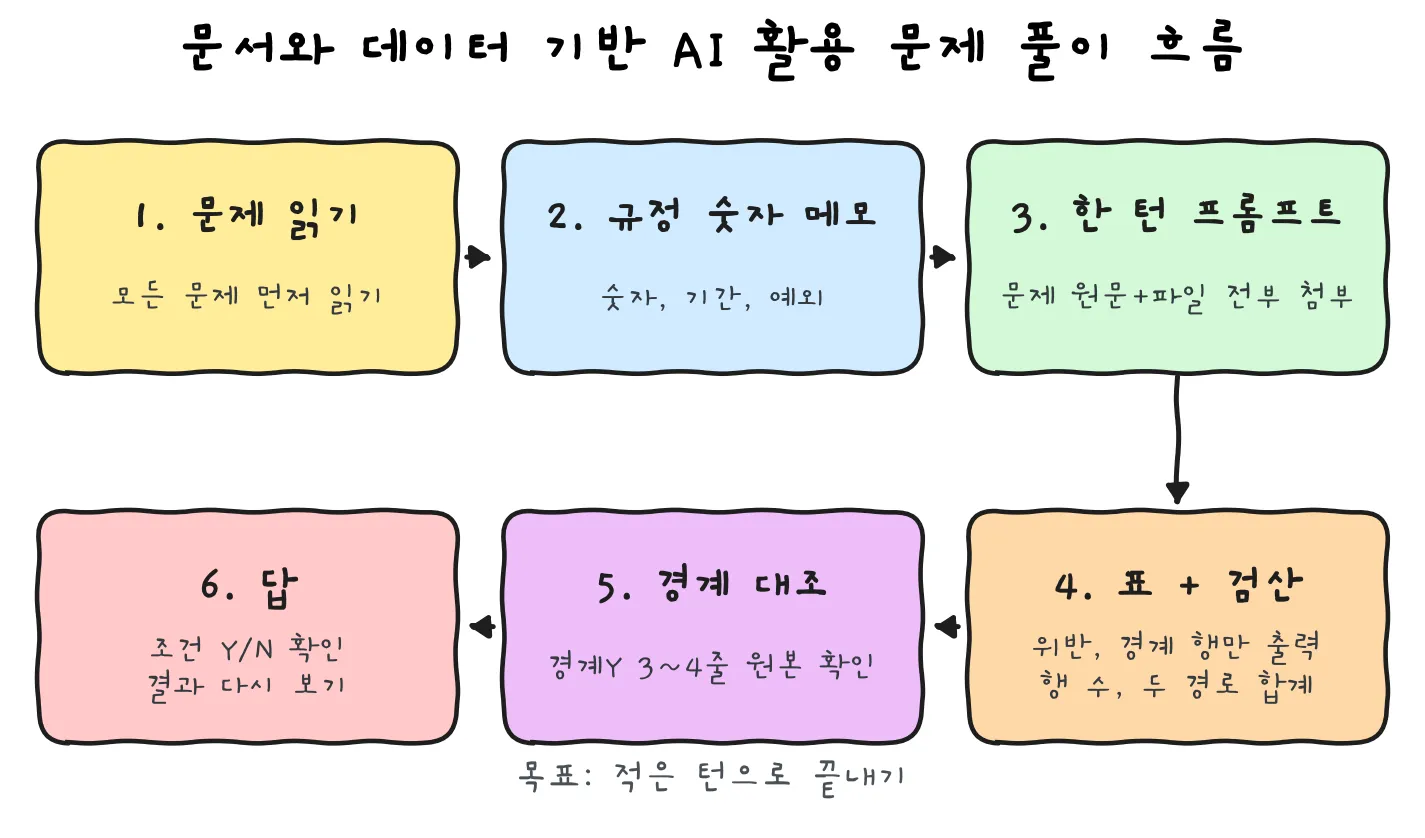
- In what order should we approach it? Read first, take notes, and instruct all at once
- What is the one-turn prompt formula?
- How should we reduce the master table and output?
- How specifically should we instruct the verification?
- What should we check for boundary cases?
- How should we manage attachments and context?
- How is this summarized when viewed through the 4D framework?
- What does an example prompt look like? (fictional travel expense policy example)
- In closing, what should we change first?
In what order should we approach it? Read first, take notes, and instruct all at once
It’s tempting to throw questions at the AI right away, but a short preparation step up front actually reduces the total time.
- Read all the questions first. See first which question uses which file and what calculations overlap.
- Extract only numbers, periods, and exceptions from the policy PDF quickly and jot them down in a notepad. Things like limit amounts, standard hours, applicable periods, and exclusion targets. There is no need to summarize the entire text of the articles.
- Note the columns needed in the table for each problem. Like “Problem 1 is judgment Y/N, Problem 3 is total loss.”
- Solve multiple problems at once with a single prompt. The goal is to finish in few turns.
💡 Asking questions one by one takes as many turns and as much time as the number of questions. If the questions make the same judgments using the same files, bundling them at once is much more efficient.
What is the one-turn prompt formula?
The order that settled into place after rewriting many times is like this:
Organize the questions → Attach all required files → Specify policy numbers and boundary criteria
→ Processing order → Table columns → Verification → Final line answer format
There are points to keep at each step.
Paste the problem text as is without summarizing
This is the part I learned the hardest way. To explain with a fictional example: a question has the condition “excluding overseas trips”, and while you summarize and copy the question, this condition gets left out. The AI calculates accurately as instructed, and the answer is wrong. Even when the AI’s response notes that the trip was overseas, it is easy to miss.
A single word like “excluding”, “exceeding”, “or more”, or “provided that” changes the answer. Paste the problem text verbatim.
Write in an ‘imperative tone’
At first, my prompts were like this: “Policy PDF is needed”, “Should be written as a table”. That’s a memo tone jotting down my thoughts. From the AI’s perspective, it’s ambiguous what it is supposed to do.
Changing the end of the sentence to an action for the AI to perform makes it much clearer.
| Memo tone (X) | Imperative tone (O) |
|---|---|
| Anomaly judgment policy is needed | Judge whether each row is an anomaly using the attached policy. |
| Data should be written as a table | Create a table with the columns below. |
| Proceed based on File B | For Problem 3, sum only the rows from File B. |
The trick is simple. End your sentences with action verbs like “Judge~”, “Create~”, “Calculate~”, “Mark~”.
Do not include design questions
Do not include questions like “Organize what additional data is needed.” Having read the problem, I already know what is needed. Instead of getting you an answer, such questions only waste a turn. Attach all required files from the start and have it solve the problems right away.
How should we reduce the master table and output?
Judge all rows, output only a subset
Have the AI judge every row, but on screen, receive output for only violation rows and boundary rows. For the rest, you only need to receive the count.
This isn’t just for speed. It leads directly to accuracy. As a fictional example, say you settle lodging costs for 15 travelers. 14 of them are accurate down to 1 won, but misreading a single row for 1 person causes a difference of 18,000 won (lodging of 80,000 won read as 98,000 won). All the rules were applied correctly, but a single line was misread in the middle of a long table. The longer the output, the higher the probability of this kind of mistake happening.
Once you attach a file, fill in all columns solvable with that file
In the turn where you attach a file, have it fill in the columns for all problems that can be solved with that file all at once. Once, I left out a comparison column to be used for another problem. When I needed that value later, the context had already faded, resulting in a wrong answer.
How specifically should we instruct the verification?
If you just write “Verify it,” the AI usually skims over the numbers it generated and says, “They match.” You must also write what to compare and how.
| Verification method | Example sentence to put in the prompt |
|---|---|
| Row count verification | “Check that original row count = excluded rows (out of period · duplicate · canceled) + remaining rows.” |
| Row-level formula column | “In each row, write out the exact formula: actual work = clock-out − clock-in − break.” |
| Compare totals via two paths | “Calculate the total by date and the total by employee separately and check that they match.” |
| Re-verify conditions | “List all conditions of the problem again, and check with Y/N whether the answer satisfies each condition.” |
The formula column is especially effective. When the formula is shown directly, any row that left out break time stands out immediately.
⚠️ Adding the same numbers again is not verification
In the fictional 18,000 won case above, when I said “Verify the total,” the AI simply added up the already incorrect per-employee numbers in order again and answered like this: “The table total and the re-summed result match.” Of course they match. Because it added the exact same numbers again. That might catch an addition mistake, but it cannot catch when the value itself is wrong.
True verification is re-attaching the original file and recalculating via a different path. For example, you can pick 2–3 employees with large amounts, have it recalculate from scratch by date, and ask it to show only the rows that differ from the previous values.
What should we check for boundary cases?
Most wrong answers come from boundaries. When reading the policy, check first whether the items below are present.
- ☐ A value exactly equal to the threshold. Whether it is ‘exceeding’ (strictly greater than) or ‘or more’ (greater than or equal to)
- ☐ The first day and last day of a period
- ☐ Times past midnight
- ☐ Duplicate submissions
- ☐ Amended or canceled cases
- ☐ Exception targets (excluded job groups, special work arrangements, etc.)
- ☐ Whether the new standard or old standard applies on the effective date itself
Have the table include a Boundary Y/N column. And for three or four rows marked Boundary Y, cross-check them directly against the original file. You don’t need to look at all of them. Checking just a few rows will quickly tell you whether the AI applied the criteria properly.
How should we manage attachments and context?
- If the conversation gets long, it’s safer to re-attach the policy file and original files. The same goes for verification. If you only keep building on the table created earlier, any error in that table carries right along.
- If the AI says ‘unable to verify’, do not use that answer. Re-attach the required files and ask again.
- Write the next prompt in advance in a notepad. That keeps your flow from breaking.
- Check the final result again at the end. Even when the calculation is right, a value can get dropped or changed while you copy it over.
How is this summarized when viewed through the 4D framework?
AI utilization competency is commonly explained by dividing it into 4Ds, and aligning the strategies above with them summarizes like this. Delegation is deciding what to leave to the AI and what to do myself. Exhaustive judgment and calculation are left to the AI, while extracting conditions and cross-checking boundary rows are done by me. Description is instructing that work clearly. Write the verbatim question text, policy numbers, processing order, table columns, and answer format in an imperative tone. Discernment is not blindly trusting the AI’s answer. Filter out ‘unable to verify’ or ‘verifications’ that merely re-add the same numbers, and recalculate via a different path. Diligence is not forgetting that the final answer is my responsibility. Check Y/N for each condition, cross-check boundary rows against the original, and check the final result one more time.
What does an example prompt look like? (fictional travel expense policy example)
Let’s apply the formula to a fictional travel expense policy example. All rules and numbers below are fictional.
- Policy: Daily allowance limit of 100,000 won per day, lodging limit of 80,000 won per night, weekend travel requires prior approval
- Data: 40 travel expense records
- Questions: 3
[Attach the needed files: policy.pdf, employee_master.xlsx, travel_records.csv]
Inspect all 40 travel expense records and answer the three questions below.
Violation criteria: ① Daily allowance > 100,000 ② Lodging > 80,000 ③ Sat·Sun and Prior approval=N. A value equal to the limit is not a violation.
Violation amount: ①② Amount exceeding the limit, ③ Full amount.
Order: Match department by employee ID → Judge case by case → Table
Table shows violation rows and boundary rows only: |Employee ID|Department|Day|Daily Allowance|Lodging|Prior Approval|Violation①②③|Violation Amount|Boundary Y/N|
Verification: Violation + Non-violation = 40, Sum of violations by department = Violation count, Re-verify Y/N per condition
Final line: Q1=N cases / Q2=N won / Q3=Department name
Pointing out which stage of the formula each line corresponds to looks like this:
- First line: Attach all required files
- Violation criteria: Policy numbers and boundary criteria. “A value equal to the limit is not a violation” is the key.
- Order: Processing order. Pin down matching the master file first.
- Table: Output only violation rows and boundary rows, and include a Boundary Y/N column.
- Verification: Row count verification, two-path total, condition re-verification
- Final line: Fix the answer format so you only have to copy and paste it as is.
In closing, what should we change first?
What I felt while repeating practice is that there are far more cases where I leave out a condition or skip a check than cases where the AI gets the calculation wrong. So half of this formula is how to instruct the AI, and the other half is how I verify it.
Boiled down to a single line, it’s like this:
Problem text verbatim, judge all rows, output only violations and boundaries, verify via a different path, check boundaries with my own eyes.
If you try changing just one thing in your next practice, start with writing the verification line specifically. That alone will change your results.
Related post: AI basics summary and 28 practice questions I made myself