Key Takeaway
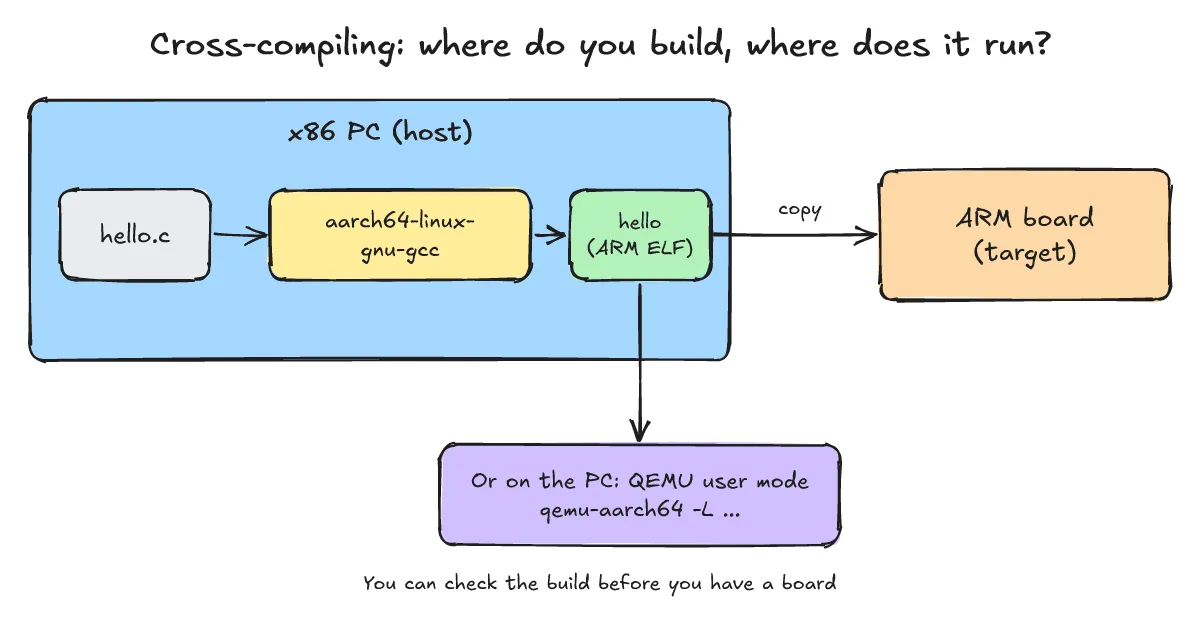
Cross-compiling means building binaries for a target architecture (such as ARM aarch64) on a development host machine (x86_64). Because embedded target boards usually have limited processing power and storage, you compile on a faster host using a dedicated cross-toolchain (aarch64-linux-gnu-gcc). Even without physical hardware on hand, QEMU user mode (qemu-aarch64 -L /usr/aarch64-linux-gnu) translates target system calls into host kernel system calls, allowing you to run and verify the binary directly on your development PC.
This post is based on actual build and run results on an x86_64 host running Debian GNU/Linux 13 (trixie). While the same package names exist on Ubuntu, the steps shown here were tested directly on Debian.
What is cross-compiling? Why not build directly on the target board?
One-line answer: When the build machine (host) and execution machine (target) use different CPU architectures, generating target binaries on the host is cross-compiling.
- Host vs. Target: The host is the PC performing the compilation (Debian 13, x86_64 in this guide), while the target is the embedded board (ARM aarch64) where the binary actually executes.
- Why not build directly on the board: Embedded boards have constrained CPU power, making compilation slow. In addition, restricted RAM and flash storage make it difficult to accommodate large source trees and intermediate build artifacts.
- Components of a toolchain: A toolchain consists of the cross-compiler (
gcc), assembler and linker (binutils), and target C library headers and binaries (sysroot). On Debian, target libraries reside under/usr/aarch64-linux-gnu, which explains why QEMU’s-Lflag points to this directory. - Deconstructing the toolchain tuple: In
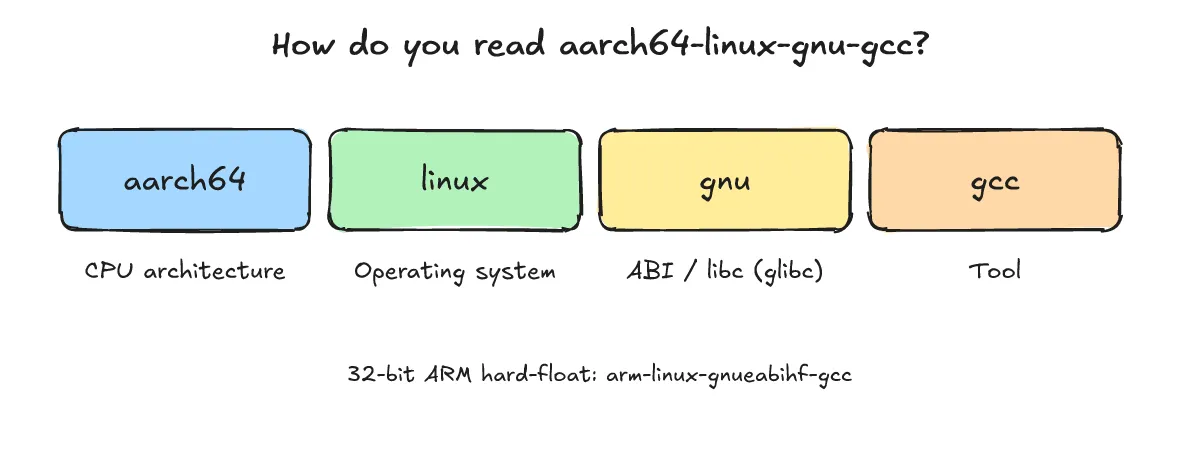
aarch64-linux-gnu-gcc, the naming convention denotes architecture (aarch64) - operating system (linux) - ABI/libc (gnu, indicating glibc) - tool (gcc). The 32-bit ARM hard-float equivalent isarm-linux-gnueabihf-gcc, mentioned here for reference only (not executed).
How do you install ARM gcc and perform the first build?
One-line answer: Install the gcc-aarch64-linux-gnu and qemu-user packages, then compile with aarch64-linux-gnu-gcc to produce an ARM aarch64 ELF binary.
-
Package installation: Install the required packages via apt; the
qemu-user-binfmtpackage is automatically pulled in as a dependency.actual output (Debian 13, gcc 14.2, QEMU 10.0.13)
$ sudo apt install gcc-aarch64-linux-gnu qemu-user -
Checking installed versions:
actual output (Debian 13, gcc 14.2, QEMU 10.0.13)
$ aarch64-linux-gnu-gcc --version aarch64-linux-gnu-gcc (Debian 14.2.0-19) 14.2.0 $ qemu-aarch64 --version qemu-aarch64 version 10.0.13 (Debian 1:10.0.13+ds-0+deb13u1) -
Example source code (
hello.c):#include <stdio.h> int main(void) { printf("Hello from aarch64!\n"); return 0; } -
First cross-compilation and binary inspection: Inspecting the resulting binary with
fileconfirms that it is an ARM aarch64 dynamically linked ELF executable requesting/lib/ld-linux-aarch64.so.1as its program interpreter.actual output (Debian 13, gcc 14.2, QEMU 10.0.13)
$ aarch64-linux-gnu-gcc hello.c -o hello $ file hello hello: ELF 64-bit LSB pie executable, ARM aarch64, version 1 (SYSV), dynamically linked, interpreter /lib/ld-linux-aarch64.so.1, BuildID[sha1]=877dd7a0…, for GNU/Linux 3.7.0, not stripped -
Comparing against a host binary and verifying the interpreter: A binary built with the host gcc targets
x86-64and uses/lib64/ld-linux-x86-64.so.2. The program interpreter requested by the ARM binary can also be inspected directly withreadelf -l.actual output (Debian 13, gcc 14.2, QEMU 10.0.13)
# x86 binary built with the host gcc, for comparison
$ file hello-x86
hello-x86: ELF 64-bit LSB pie executable, x86-64, ... interpreter /lib64/ld-linux-x86-64.so.2

# check the ARM binary's program interpreter
$ aarch64-linux-gnu-readelf -l hello
[Requesting program interpreter: /lib/ld-linux-aarch64.so.1]
How do you run the built ARM binary on a PC?
One-line answer: Run the binary through QEMU user mode with qemu-aarch64 -L /usr/aarch64-linux-gnu ./hello; dynamic binaries require the -L flag to locate the target sysroot.
-
How QEMU user mode works: According to the QEMU user-mode documentation, user-mode emulation runs Linux processes compiled for another CPU architecture by intercepting and passing their system calls to the host kernel. The official documentation defines it as a “generic system call translator” that adjusts endianness and 32/64-bit parameter sizes before invoking equivalent host syscalls. Unlike full system emulation, it does not virtualize an entire operating system. Key options include
-L pathto specify the ELF interpreter prefix, while theQEMU_STRACEenvironment variable logs syscall activity for debugging. -
Direct execution on the host fails: An x86_64 kernel cannot parse or execute ARM instructions directly. If the kernel has
binfmt_miscregistered (via the Debianqemu-user-binfmtpackage), direct execution with./hellois possible; however, because this session ran in a container withoutbinfmt_miscmounted, execution resulted in an explicit format error.actual output (Debian 13, gcc 14.2, QEMU 10.0.13)
$ ./hello bash: line 1: ./hello: cannot execute binary file: Exec format error -
Running plain
qemu-aarch64triggers a dynamic linker error: Without a sysroot prefix, QEMU looks for the ARM dynamic linker in the host’s/libdirectory, where it does not exist.actual output (Debian 13, gcc 14.2, QEMU 10.0.13)
$ qemu-aarch64 ./hello qemu-aarch64: Could not open '/lib/ld-linux-aarch64.so.1': No such file or directory -
Supplying the target sysroot with
-Lexecutes successfully: Because Debian installs the ARM dynamic linker and C library under/usr/aarch64-linux-gnu, passing that prefix via-Lresolves all runtime dependencies.actual output (Debian 13, gcc 14.2, QEMU 10.0.13)
$ qemu-aarch64 -L /usr/aarch64-linux-gnu ./hello Hello from aarch64! -
Statically linked binaries run without
-L: Compiling with the-staticflag embeds all required library code into the binary. Because it has no external dependencies or dynamic interpreter requirements, it runs directly under QEMU without extra path arguments.actual output (Debian 13, gcc 14.2, QEMU 10.0.13)
$ aarch64-linux-gnu-gcc -static hello.c -o hello-static
$ file hello-static
hello-static: ELF 64-bit LSB executable, ARM aarch64, version 1 (GNU/Linux), statically linked, BuildID[sha1]=424b08be…, for GNU/Linux 3.7.0, not stripped
$ qemu-aarch64 ./hello-static
Hello from aarch64!
What are the common pitfalls in cross-compiling?
One-line answer: The most frequent issues are accidentally linking host libraries, omitting dynamic linker search paths, and glibc version mismatches between the toolchain and target board.
Q1. What happens if a cross-build attempts to link host libraries?
If library search paths point to host directories like /usr/lib or /lib, host x86_64 libraries get pulled into the link step, causing architecture mismatch errors. Configure your build system to strictly isolate header and library searches to the target sysroot (such as /usr/aarch64-linux-gnu on Debian).
Q2. How do you resolve `Could not open '/lib/ld-linux-aarch64.so.1'`?
This occurs when QEMU user mode searches the host’s /lib directory instead of the target environment for the ARM dynamic linker. Provide the target library prefix using qemu-aarch64 -L /usr/aarch64-linux-gnu, or compile with -static for quick standalone testing.
Q3. Why might a compiled binary fail on the physical board with `GLIBC_X.XX not found`?
Binaries built using a modern host cross-toolchain may link against newer glibc symbol versions than those available in older target firmware. Ensure your toolchain targets the exact glibc version deployed on the board, or generate a matching SDK directly from the board’s root filesystem build configuration.
Q4. What is the recommended next step beyond a single source file?
For complex multi-file projects, transition to a CMake toolchain file or a dedicated Yocto SDK. To learn how to generate complete system images for QEMU targets, refer to the first Yocto bitbake build (Korean); for setting up target debugging, see embedded Linux gdb crash analysis (Korean).