Key Takeaway
Embedded IoT security is the practice of designing defenses for hardware that directly operates physical equipment and runs unattended in the field for long periods. This requires setting unique per-device initial passwords, preventing management interfaces from being exposed to the public internet, and separating read (sensor) operations from write (actuator) controls right from the architecture stage. The OWASP IoT Top 10 also lists basic weaknesses such as weak or default passwords, insecure network services, and insecure default settings among its main categories. Engineering defaults must therefore include mandatory password changes on first boot, network isolation behind a VPN or firewall, one-way telemetry, and cryptographically signed firmware updates.
A recent incident where supermarket refrigeration systems across Europe were remotely triggered into automatic defrosting was discussed in a Hacker News thread. Rather than analyzing that specific incident, this post outlines the general defensive principles that embedded developers can apply to safeguard connected devices.
What is embedded IoT security? How do embedded devices differ from PCs?
Interview one-liner: Embedded IoT security protects hardware that operates physical machinery and remains deployed across remote field locations over long lifecycles. It enforces unique credentials on first boot, restricts open listening addresses instead of binding to 0.0.0.0, and separates sensor telemetry from actuator control at the architectural level.
- Long lifecycle: Unlike conventional PCs, industrial and commercial controllers often remain active in the field for years once installed. The security posture established at product launch often persists unchanged throughout the device’s operational life.
- Difficult update process: These devices rarely have screens, keyboards, or accessible input interfaces, and they are dispersed across remote sites. If the remote update mechanism is unreliable, an update failure often necessitates an on-site service visit.
- Physically distributed deployment: Rather than residing in climate-controlled server rooms with physical access controls, devices are mounted in ceilings, electrical switchboards, or outdoor compressor units, making regular physical monitoring impractical.
- Direct physical impact: Embedded controllers do not merely process or display data; they directly actuate chillers, heaters, valves, and motors. A security breach can directly trigger physical equipment malfunction or operational disruptions.
- Regulatory landscape: According to the official EU Cyber Resilience Act (CRA) portal, the regulation entered into force on 10 December 2024. Its core obligations take effect on 11 December 2027, while mandatory reporting of actively exploited vulnerabilities applies earlier, as of 11 September 2026.
How are embedded devices primarily compromised?
Interview one-liner: Typical ways embedded devices get compromised are shared default passwords, predictable backdoor service codes, unauthenticated management endpoints, and direct internet exposure via 0.0.0.0 bindings.
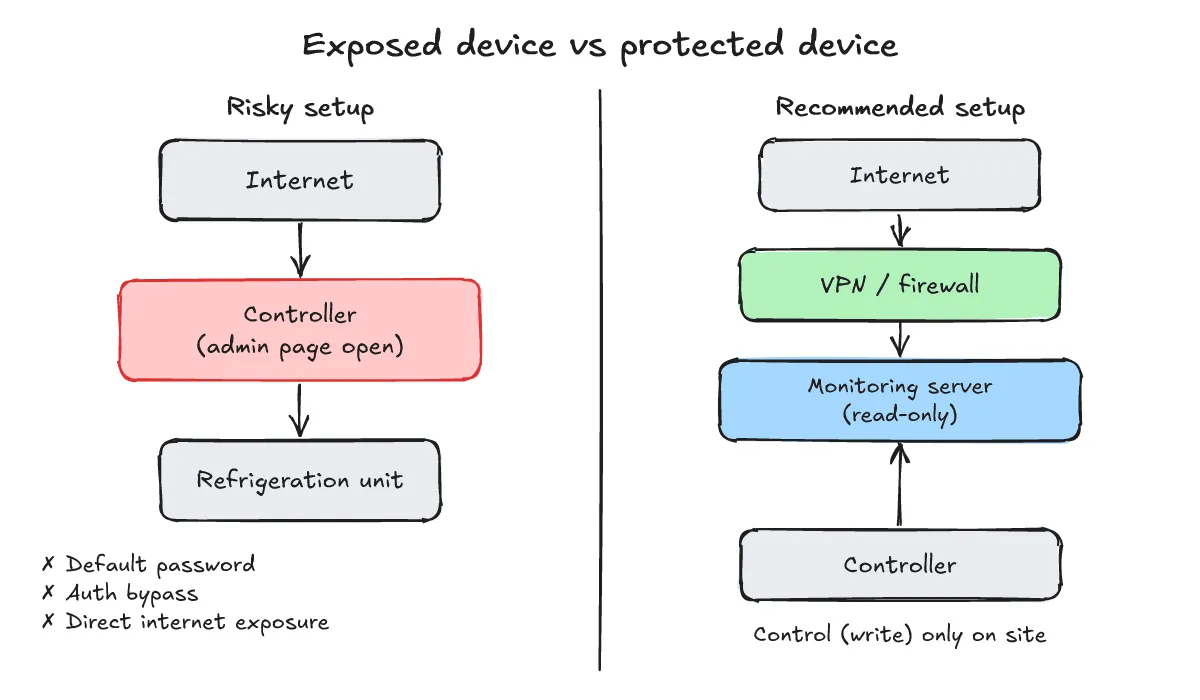
- Common attack vectors: According to discussions on Hacker News, remote attackers typically use internet-wide device scanning engines to discover management web interfaces exposed directly to the public internet, subsequently targeting interfaces that lack authentication or feature authentication bypass flaws. This post focuses on defensive posture and does not cover exploit reproduction or attack payloads.
- Mapping to the OWASP IoT Top 10 (2018 Edition): Aligning these common attack paths with the 2018 edition of the OWASP Internet of Things Project highlights several key categories:
- I1 Weak, Guessable, or Hardcoded Passwords: Shared factory default credentials, or predictable service codes derived from timestamps or static patterns.
- I2 Insecure Network Services: Unnecessary listening network services exposed directly to the public internet without firewall protection.
- I3 Insecure Ecosystem Interfaces: Management APIs accessible without authentication, or endpoints vulnerable to authentication bypass.
- I4 Lack of Secure Update Mechanism: Firmware updates accepted without cryptographic signature verification, or devices left unpatched.
- I5 Use of Insecure or Outdated Components: Outdated kernels, vulnerable third-party libraries, and deprecated software components.
- Remaining categories: I6 Insufficient Privacy Protection, I7 Insecure Data Transfer and Storage, I8 Lack of Device Management, I9 Insecure Default Settings, and I10 Lack of Physical Hardening.
- Chained vulnerabilities: When direct internet exposure (I2), insecure default settings (I9), and default credentials (I1) or an authentication bypass (I3) coincide, an external attacker can gain administrative access and dispatch control commands directly to operating equipment. A chain of weak defaults is often more dangerous than any single flaw.
What must developers prevent during the design phase?
Interview one-liner: Establish secure defaults: require unique credentials per device with mandatory first-boot password changes, eliminate 0.0.0.0 bindings behind VPNs or firewalls, isolate sensor telemetry from actuator controls, and mandate cryptographically signed firmware updates.
- Per-device unique initial passwords with forced change: Avoid universal factory passwords across product lines. Require administrators to configure a new password during initial setup before operational features become active (mitigating I1 and I9).
- Prevent internet exposure of management interfaces: Never bind administrative web consoles or management shells to
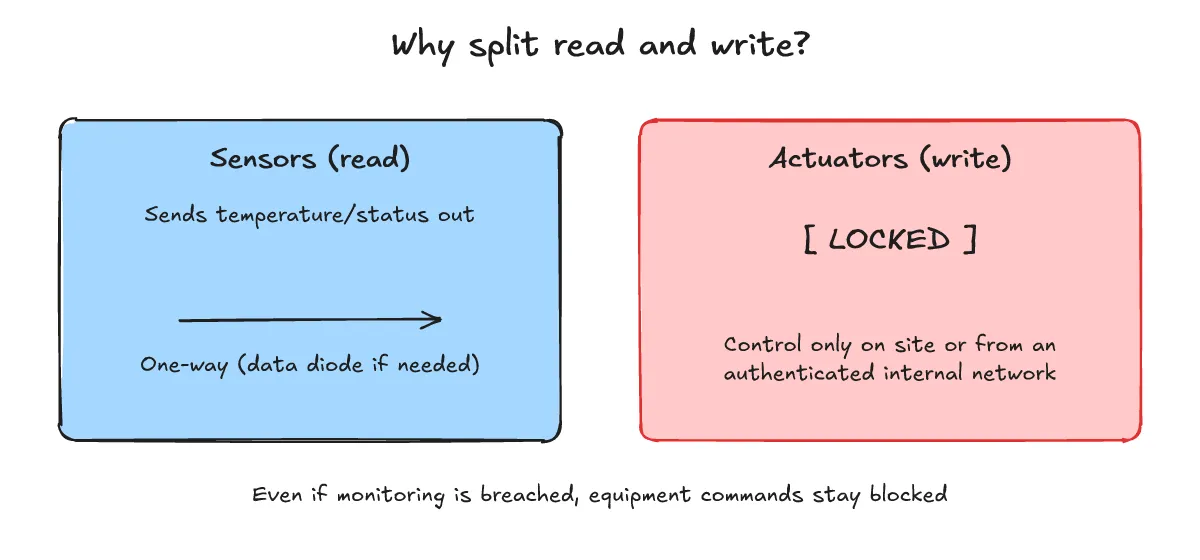
0.0.0.0. Restrict listening sockets to127.0.0.1or a dedicated internal management network, placing all remote management access strictly behind a VPN and firewall (mitigating I2). - Architectural separation of telemetry and control: Send sensor measurements outward to telemetry servers over one-way connections, employing data diodes or unidirectional gateways where appropriate. Restrict write commands that operate physical actuators strictly to local on-site interfaces or tightly authenticated internal management networks.
- Cryptographically signed firmware updates and user alerts: Ensure the bootloader and update daemon verify digital signatures before writing firmware images to flash memory, and provide clear notifications when security patches are released (mitigating I4).
- Principle of least privilege and comprehensive logging: Execute background daemons with minimal operating system privileges, and record all external connection attempts and authentication events to facilitate security audits.
When debugging firmware misbehavior or abnormal exits on a field device, the post on embedded Linux gdb crash analysis (Korean) may also help.
How should operational devices be audited? (Checklist)
Interview one-liner: On the device, run ss -tlnp to locate services listening on 0.0.0.0 and bind them back to loopback or behind a VPN, then routinely remove default accounts, compare firmware versions against security advisories, and review remote-access logs.
-
Check listening ports and network sockets: Run
ss -tlnpon the Linux device to see which process is listening on which address. When checking from outside the device, use your own scanner and only test networks you are authorized to evaluate. -
Remove default and test accounts: Purge test accounts and shared default passwords that shipped with the device.
-
Compare firmware versions: Cross-reference the current firmware version against published vendor security bulletins and advisories.
-
Review remote-access logs: Inspect authentication logs for repeated login failures or connection requests from unfamiliar external IP addresses.
-
Actual output (iproute2 6.15 ss): Two local HTTP test servers show the difference between binding to
0.0.0.0and127.0.0.1: one bound to0.0.0.0, the other to127.0.0.1.python3 -m http.server 18080 --bind 0.0.0.0 & python3 -m http.server 18081 --bind 127.0.0.1 & ss -tlnThe actual output, filtered to these two ports:
State Recv-Q Send-Q Local Address:Port Peer Address:Port LISTEN 0 5 127.0.0.1:18081 0.0.0.0:* LISTEN 0 5 0.0.0.0:18080 0.0.0.0:* -
Reading the output:
0.0.0.0:18080means it accepts connections on every interface of the device, so without a firewall it is reachable from anywhere on the network.127.0.0.1:18081is reachable only from the device itself. Turn off unnecessary services or change their bind address to127.0.0.1, and usess -tlnpto identify which process owns each listening socket.
For toolchain setup and compilation workflows, see the upcoming post “What is cross-compilation?” (Korean title: 「크로스 컴파일이란?」).