Key Takeaway
The map vs unordered_map difference comes down to internal structure: std::map is a tree that keeps keys sorted, guaranteeing O(log n) for lookup, insertion, and deletion, while std::unordered_map uses hash buckets for average O(1) but no ordering. Choose map when you need sorting or range search, and unordered_map when you mostly do single-key lookups and order doesn’t matter.
In coding tests, interviews, and real-world work, it’s often hard to decide between std::map and std::unordered_map. This post lays out the criteria for choosing between the two associative containers based on internal structure, time complexity, iteration order, and memory characteristics.
std::map vs std::unordered_map: What’s the Internal Structure Difference (Red-Black Tree vs Hash Table)?
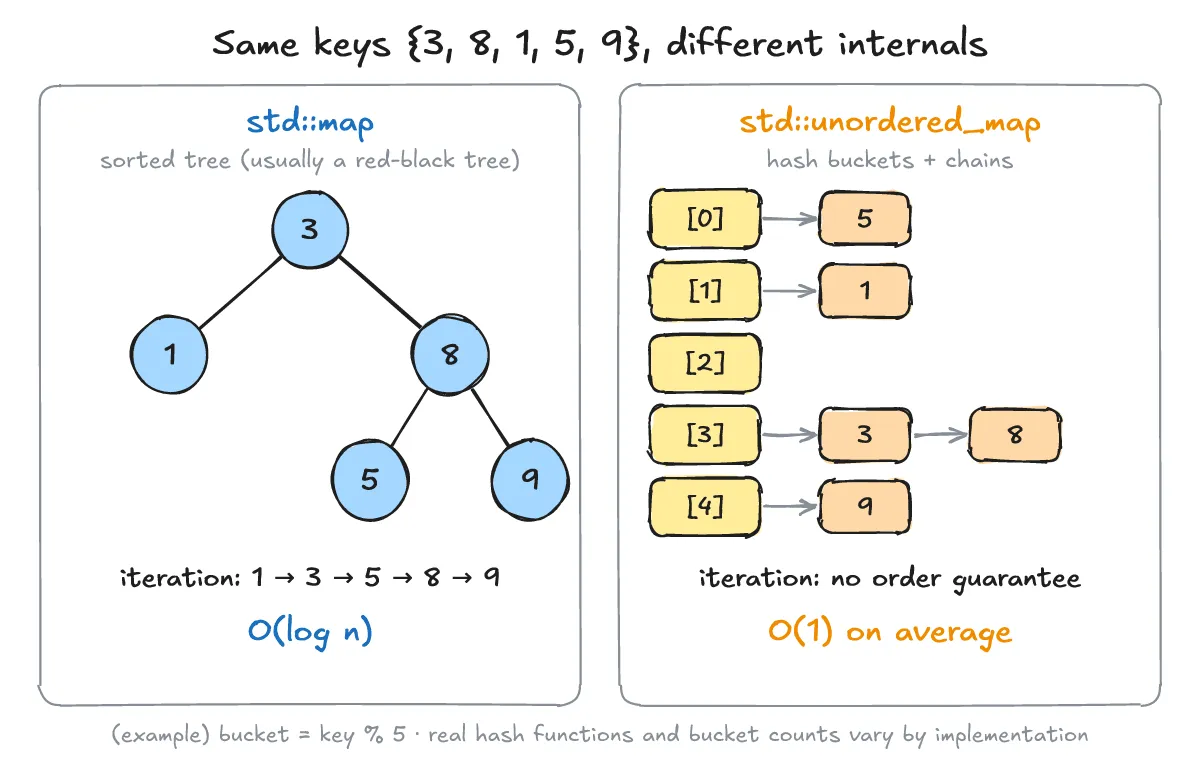
One-line answer: map is a tree that keeps keys sorted, and unordered_map is a hash bucket structure.
-
Structure: std::map is a tree structure that keeps keys in sorted order, typically implemented as a red-black tree (the standard only specifies complexity and behavior, not a red-black tree specifically). std::unordered_map is a hash table that places elements into buckets determined by the hash value of the key. (Source: std::map, std::unordered_map)
-
Key requirements: map needs key comparison (operator< or a Compare, defaulting to std::less), while unordered_map needs a hash (std::hash or a Hash) and an equality comparison (operator==, defaulting to std::equal_to).
-
Usage is almost identical. The code below outputs exactly two lines, “map: 3” and “unordered_map: 3”.
#include <iostream>
#include <map>
#include <string>
#include <unordered_map>

int main() {
    std::map<std::string, int> m;
    std::unordered_map<std::string, int> um;

    m["apple"] = 3;
    m.insert({"banana", 5});
    um["apple"] = 3;
    um.insert({"banana", 5});

    if (auto it = m.find("apple"); it != m.end())
        std::cout << "map: " << it->second << '\n';
    if (auto it = um.find("apple"); it != um.end())
        std::cout << "unordered_map: " << it->second << '\n';
}- From C++20 on, instead of
find(key) != end(), you can check existence withcontains(key), likem.contains(3). The code above uses the C++17 baseline.
#include <iostream>
#include <map>

int main() {
    std::map<int, char> m{{3, 'c'}};
    if (m.contains(3))  // C++20
        std::cout << "found\n";
}
O(log n) vs Average O(1) Time Complexity — What Happens in the Worst Case?
One-line answer: map guarantees O(log n) for lookup, insertion, and deletion, while unordered_map is average O(1) but can degrade to worst-case O(n) on hash collisions.
-
map: Lookup, insertion, and deletion are all O(log n) (logarithmic).
-
unordered_map: Average O(1), but if hash collisions pile up into a single bucket, it can degrade to worst-case O(n) (linear in the container size).
-
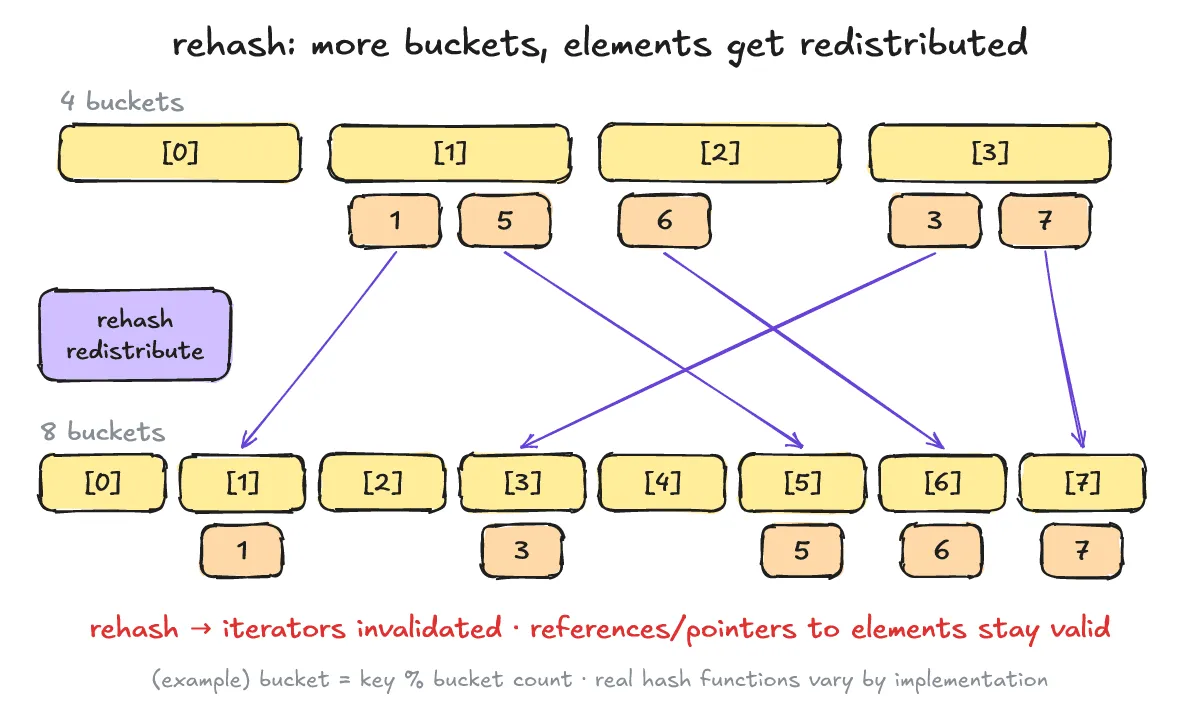
Rehash: as elements grow and the load factor (average elements per bucket) exceeds max_load_factor, the bucket array grows and elements are redistributed (rehash). All iterators are invalidated at that point, but references and pointers to the elements remain valid until that specific element is erased.
- With reserve(n), you can pre-allocate buckets so up to n elements fit without triggering a rehash, and max_load_factor lets you tune the threshold. In the code below, the first output line is 1000.
#include <iostream>
#include <unordered_map>

int main() {
    std::unordered_map<int, int> um;
    um.reserve(1000);  // pre-allocate buckets so up to 1000 elements fit without a rehash

    for (int i = 0; i < 1000; ++i)
        um[i] = i * i;

    std::cout << um.size() << '\n';           // 1000
    std::cout << um.max_load_factor() << '\n'; // upper limit on the average number of elements per bucket
}
When Do You Need Sorted Traversal, Key Range Search, or Memory? What’s the Criterion?
One-line answer: Use map when you need sorted traversal and key range search, and unordered_map when you mostly do single-key lookups and order doesn’t matter.
-
Iteration order: map always iterates in ascending key order (per its Compare), while unordered_map provides no order guarantee (it depends on the implementation and bucket count, and can change after a rehash).
-
Range search: lower_bound/upper_bound (based on key order) exist only on map. In the code below, map’s output is “1 3 5 8 9” and “5 8”. The unordered_map loop has no order guarantee, so no sample output is given for it.
#include <iostream>
#include <map>
#include <unordered_map>

int main() {
    std::map<int, char> m{{3, 'c'}, {8, 'h'}, {1, 'a'}, {5, 'e'}, {9, 'i'}};

    for (const auto& [k, v] : m)
        std::cout << k << ' ';   // 1 3 5 8 9 (always ascending key order)
    std::cout << '\n';

    // iterate only over keys from 4 to 8 inclusive
    for (auto it = m.lower_bound(4); it != m.upper_bound(8); ++it)
        std::cout << it->first << ' ';   // 5 8
    std::cout << '\n';

    std::unordered_map<int, char> um(m.begin(), m.end());
    for (const auto& [k, v] : um)
        std::cout << k << ' ';   // no order guarantee (depends on implementation and bucket count)
    std::cout << '\n';
}- Custom keys: unordered_map needs a std::hash specialization or a hash function object plus operator==, while map only needs operator< (or a Compare). In the code below, the hash combination is a simple illustration, not a recommended high-quality hash. The output is 1.
#include <cstddef>
#include <functional>
#include <iostream>
#include <string>
#include <unordered_map>

struct Point {
    int x;
    int y;
    bool operator==(const Point& o) const { return x == o.x && y == o.y; }
};

struct PointHash {
    std::size_t operator()(const Point& p) const {
        std::size_t h1 = std::hash<int>{}(p.x);
        std::size_t h2 = std::hash<int>{}(p.y);
        return h1 ^ (h2 << 1);  // simple combination for illustration
    }
};

int main() {
    std::unordered_map<Point, std::string, PointHash> names;
    names[{1, 2}] = "A";
    std::cout << names.count({1, 2}) << '\n';  // 1
}-
Memory (qualitative): map stores a tree node per element (including child/parent links), while unordered_map stores a bucket array plus element nodes. Which one uses less memory depends on the implementation and load factor, so no definitive claim is made.
-
Decision table:
| Situation | Choice |
|---|---|
| Need sorted traversal or key range search | map |
| Mostly single-key lookups, order doesn’t matter | unordered_map |
| Hard to build a hash function, but comparison is possible | map |
| Need O(log n) guaranteed even in the worst case | map |
[Interview two-liner] map manages keys in a sorted tree, so lookup, insertion, and deletion are guaranteed O(log n), and sorted traversal and range search are possible. unordered_map is a hash table, so it’s fast on average at O(1), but there’s no ordering and collisions can degrade it to worst-case O(n) — pick it when you don’t need sorting or ranges and do mostly single-key lookups.
Shall We Check Your Understanding With a Q&A?
Q1. Is map’s internal structure always a red-black tree?
A1. No. The C++ standard only specifies complexity and behavior (such as guaranteeing O(log n)) and does not mandate a specific data structure. That said, implementations typically use a red-black tree to satisfy those guarantees.
Q2. What happens when unordered_map grows and triggers a rehash?
A2. The bucket array is reallocated and all iterators are invalidated. However, references and pointers to the elements remain valid until that specific element is erased.
Q3. Is unordered_map always faster even when the data set is very small?
A3. No. Average O(1) only describes the trend as the data grows; with very little data, fixed costs such as computing the hash take up a larger share, so which one is faster has to be measured in the actual environment.