Summary
A watchdog timer is a hardware timer that resets the system if software does not send an “I’m alive” signal (a kick or ping) within a set time. Its purpose is to bring a system back on its own, without a human, even when a program hangs or falls into an infinite loop.
One-line answer: If no kick arrives in time, the hardware resets the system.
What is a watchdog timer, and why is it needed?
One-line answer: It is a hardware circuit that resets the system when software stops reporting that it is alive, so unattended devices can recover from a hang without a person.
The Linux kernel documentation describes a watchdog timer (WDT) as a hardware circuit that can reset the system when software faults. A userspace daemon notifies the driver through /dev/watchdog at regular intervals, and if those notifications stop, the hardware resets the system after the timeout.
On a device installed in the field where nobody can power-cycle it, a single hang can leave it dead indefinitely. The watchdog is the last safety net that recovers from hangs and infinite loops without human help.
How does a watchdog work?
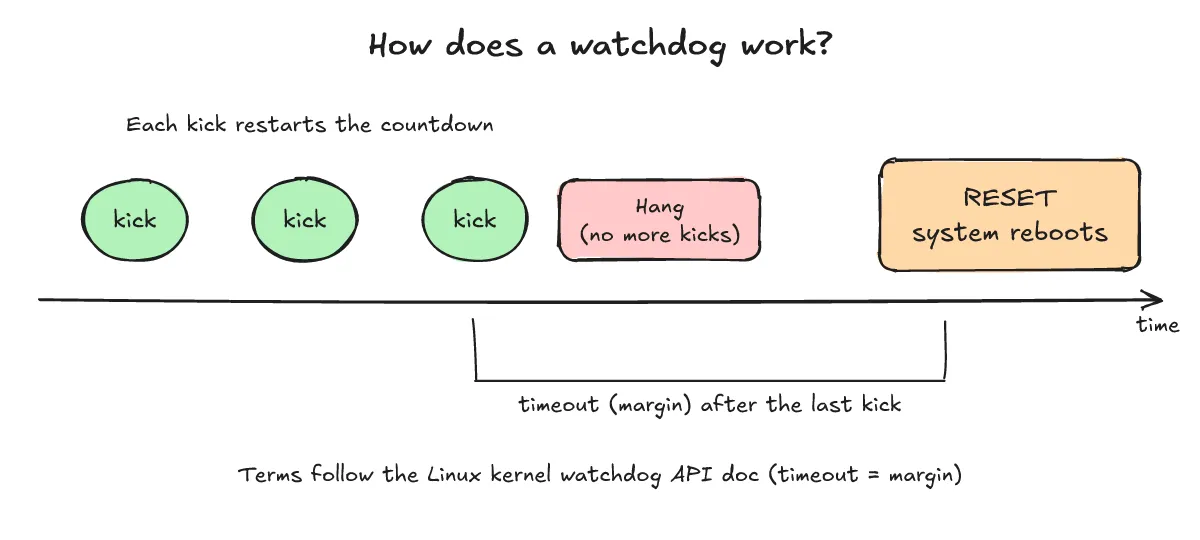
One-line answer: It counts down, a kick resets the countdown, and if kicks stop the timeout expires and the system is reset.
According to the kernel docs, the watchdog becomes active as soon as /dev/watchdog is opened, and the system reboots unless it is pinged within the period the docs call the “timeout” or “margin”. The simplest ping is writing any data to the device.
- Once started, the timer counts down.
- If software kicks (pings) within the timeout, the countdown restarts from the beginning.
- If the program hangs and kicks stop, the countdown runs to the end.
- When the timeout expires, the hardware resets the system.
Where should the kick happen?
One-line answer: Kick only after checking that the main tasks are healthy, never unconditionally.
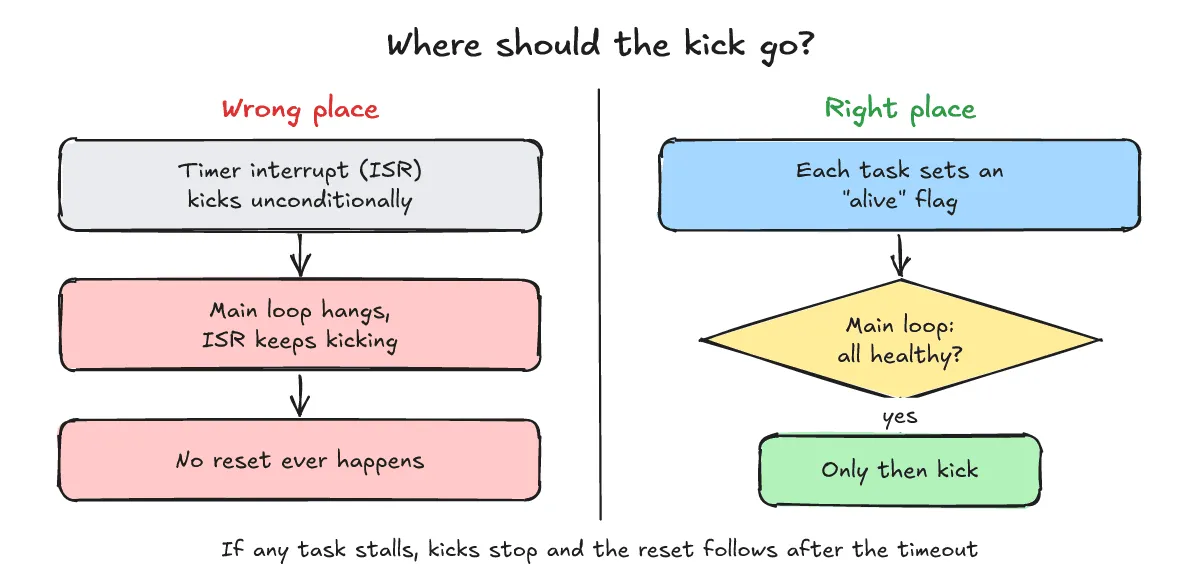
A classic interview trap is kicking unconditionally from a timer ISR. The timer interrupt keeps firing even when the main loop is stuck, so kicks keep arriving and the watchdog never fires.
The fix is to have each task set an “alive” flag, then have the main loop check all the flags, kick, and clear them. If any flag is missing, there is no kick and the watchdog resets the system.
- Wrong: kick unconditionally in the timer ISR, so kicks continue even if the main loop hangs.
- Right: each task sets its alive flag, the main loop checks all of them, then kicks and clears the flags.
How is a watchdog used on Linux?
One-line answer: Open /dev/watchdog to start it, ping with a write or WDIOC_KEEPALIVE before the timeout, and close it properly with Magic Close.
- Start and ping: opening the device starts the watchdog. Writing any data and the
WDIOC_KEEPALIVEioctl have exactly the same effect. - Magic Close: closing the device normally stops the watchdog, but with Magic Close the driver disables it only if the magic character
'V'was written just before closing. Otherwise it assumes the daemon died and the system reboots after the timeout. - NOWAYOUT: with
CONFIG_WATCHDOG_NOWAYOUT=Y(or thenowayoutmodule parameter), a started watchdog cannot be disabled. - Setting the timeout:
WDIOC_SETTIMEOUTtakes seconds, and the driver returns the actual timeout, which may differ because of hardware granularity. Read it back withWDIOC_GETTIMEOUT. - Pretimeout: some watchdogs trigger an NMI or interrupt before the reset so Linux can record panic information or coredumps.
WDIOC_SETPRETIMEOUTis the number of seconds before the timeout. In the kernel doc’s example, a timeout of 60 and a pretimeout of 10 fires at 50. Not all drivers support it. - Finding the reset cause:
WDIOC_GETBOOTSTATUSreturns the status at the last reboot, andWDIOF_CARDRESETmeans the last reboot was caused by the watchdog. Not all devices support it.
The kernel doc notes that the API is ad hoc and that drivers implement different parts of it, so support varies from driver to driver. Its header also says it describes the state of Linux 2.4.18 and was last reviewed in 2007, so check your own kernel and driver before relying on it.
Below is a simplified example at the doc’s level (not run, no output).
int fd = open("/dev/watchdog", O_WRONLY);

while (1) {
    ioctl(fd, WDIOC_KEEPALIVE, 0);
    sleep(10);
}

/* On a clean shutdown: write the magic character 'V' just before closing. */
write(fd, "V", 1);
close(fd);
systemd services can use WatchdogSec=, in which case the service must send a WATCHDOG=1 keep-alive via sd_notify. For service-file keywords, see the earlier post “systemd Type= explained: simple, exec, notify and key service-file keywords”.
What watchdog questions come up in interviews?
One-line answer: Mostly hardware vs software watchdogs, how to choose a timeout, how to find the reset cause, and behavior while debugging.
How do hardware and software watchdogs differ?
A software watchdog runs on the same kernel and CPU it is supervising, so it dies with them. A hardware timer counts independently and can still reset the system when everything has frozen. This is general reasoning about the architecture.
How do you choose the timeout?
There is no magic number. It should be longer than the worst-case normal loop or boot path, and short enough to meet your recovery requirements. Check the hardware maximum too, and remember that WDIOC_SETTIMEOUT returns the value actually applied.
How do you tell whether the last reset came from the watchdog?
If the device supports it, read WDIOC_GETBOOTSTATUS and check for WDIOF_CARDRESET, which means the last reboot was caused by the watchdog. Not all devices support it.
What happens to the watchdog while debugging?
A breakpoint stops the kicks, so an unexpected reset can occur. Disable or stop the watchdog with whatever method your system supports, but with NOWAYOUT that is not possible. For gdb, see our gdb post.
When is pretimeout useful?
It lets you capture panic information or a coredump just before the reset, which helps trace the cause. It works only if the driver supports it.
What related posts are worth reading?
One-line answer: The gdb post covers debugging with a watchdog, and the systemd post covers service-level watchdogs.
- gdb post
- systemd Type= explained: simple, exec, notify and key service-file keywords
What are the sources?
One-line answer: The Linux kernel watchdog API doc and the systemd.service man page.
- The Linux Watchdog driver API (Linux kernel docs) — checked 2026-10-21
- systemd.service man page (WatchdogSec=) — checked 2026-10-21