Key takeaways
The .data vs .bss difference comes down to initial values. .data holds global and static variables with a non-zero initial value, and those values are stored in the file (in flash on embedded targets). .bss holds variables with no initializer or a zero value; only its size is recorded in the file, and it is zero-filled at startup. That is why a large zero-initialized global array does not make the executable bigger.
All numbers in this post are samples I measured on an x86-64 Linux host on 2026-10-23 (KST), using gcc (Debian 14.2.0-19) 14.2.0 and GNU size (GNU Binutils for Debian) 2.44. Section sizes can differ by architecture, compiler, and options.
What is the .data vs .bss difference?
One-line answer: .data is the section for global and static variables with a non-zero initial value; .bss is for those with no initializer or a zero value.
To understand the .data vs .bss difference, it helps to see the memory sections of a program as a whole. This post covers the following areas.
.text: executable code (functions).rodata: read-only data (such as const globals).data: global and static variables with a non-zero initial value.bss: global and static variables with no initializer or a zero value- Heap: memory allocated dynamically at run time (grows upward)
- Stack: local variables and call frames (grows downward)
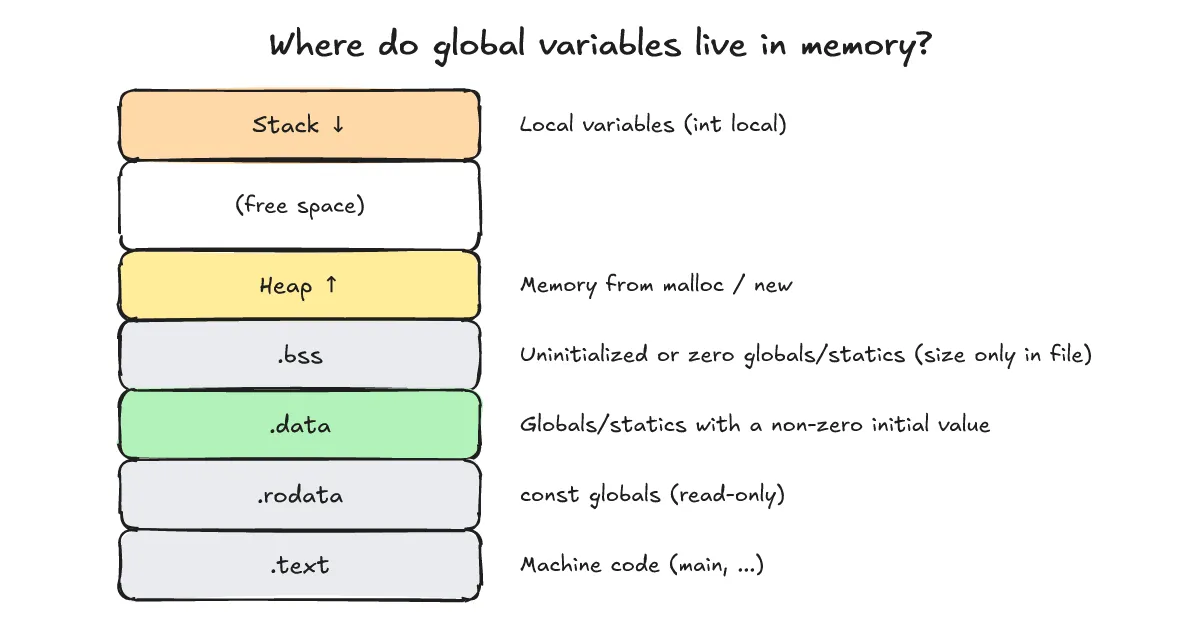
Which section does each variable go into?
One-line answer: A non-zero initializer means .data, none or zero means .bss, a const global goes to .rodata on this x86-64 host, and a local variable lives on the stack.
I checked this with the sections.c below. The comments show the section I expect for each variable.
int initialized_global = 42;      /* .data */
int zero_global;                  /* .bss */
static int zero_static = 0;       /* .bss */
const int read_only = 7;          /* .rodata */
int big_buffer[1024];             /* .bss : 파일 크기에 안 들어감 */
int main(void) {
    int local = 1;                /* 스택 */
    return initialized_global + zero_global + zero_static + read_only + big_buffer[0] + local;
}
This is the output of gcc -O0 -c sections.c && size sections.o. On this x86-64 host it reports text 115, data 4, and bss 4132. (The Korean text inside the code comments says that big_buffer does not count toward the file size, and that local lives on the stack.)
   text	   data	    bss	    dec	    hex	filename
    115	      4	   4132	   4251	   109b	sections.o
Here are the per-section sizes from size -A sections.o.
sections.o  :
section           size   addr
.text               55      0
.data                4      0
.bss              4132      0
.rodata              4      0
.comment            32      0
.note.GNU-stack      0      0
.eh_frame           56      0
Total             4283
Relevant lines only, excerpted from objdump -t sections.o:
sections.o:     file format elf64-x86-64

SYMBOL TABLE:
0000000000001020 l     O .bss	0000000000000004 zero_static
0000000000000000 g     O .data	0000000000000004 initialized_global
0000000000000000 g     O .bss	0000000000000004 zero_global
0000000000000000 g     O .rodata	0000000000000004 read_only
0000000000000020 g     O .bss	0000000000001000 big_buffer
0000000000000000 g     F .text	0000000000000037 main
How to read it: the second column, l or g, is the local or global binding, and a static variable shows l. O means object (a variable) and F means function. Next come the section name, the size in hex, and the symbol name. The 0x1000 for big_buffer is 4096 bytes, which equals 1024 four-byte ints on this host. The local variable local lives on the stack, so it does not appear in the symbol table.
A cross toolchain also ships size and objdump (aarch64 cross-compile CMake toolchain). To check symbol addresses at run time, see the gdb post.
Why doesn’t .bss increase the file size?
One-line answer: Because .bss only carries a size; the zeros themselves are not stored in the file.
I built two executables from the same code that differ only in big_buffer. sections_big uses int big_buffer[1024];, while sections_small (from sections_small.c) uses int big_buffer[1]; and is otherwise identical. Both were linked with gcc on this host. This is the output of size sections_big sections_small.
   text	   data	    bss	    dec	    hex	filename
   1264	    532	   4168	   5964	   174c	sections_big
   1264	    532	     20	   1816	    718	sections_small
File sizes in bytes, from stat -c '%s %n':
16024 sections_big
16032 sections_small
On this x86-64 host, bss differs a lot (4168 vs 20), yet the file did not grow by the roughly 4 KB array. In this run sections_big is even 8 bytes smaller; a difference of a few bytes like this can come from the linker’s section placement and alignment. The key point is that even though size -A sections.o above lists .bss at 4132 bytes (.data at 4), .bss records only a size and stores no zeros, so it does not take up array-sized space in the file. Also, the text 1264 and data 532 include C runtime startup code, not just our variables.
What happens at startup on an embedded system?
One-line answer: Startup code copies the initial .data values from flash to RAM, zero-fills .bss, and then calls main.
In a typical embedded setup, .text, .rodata, and the initial values of .data sit in flash (non-volatile memory). Before main runs, startup code copies the .data initial values from flash to RAM, zero-fills the .bss region, sets up the stack, and then calls main. A linker script defines this layout; I only mention it here. On a hosted Linux system, the loader and kernel map .data from the file and provide zero-filled pages for .bss.
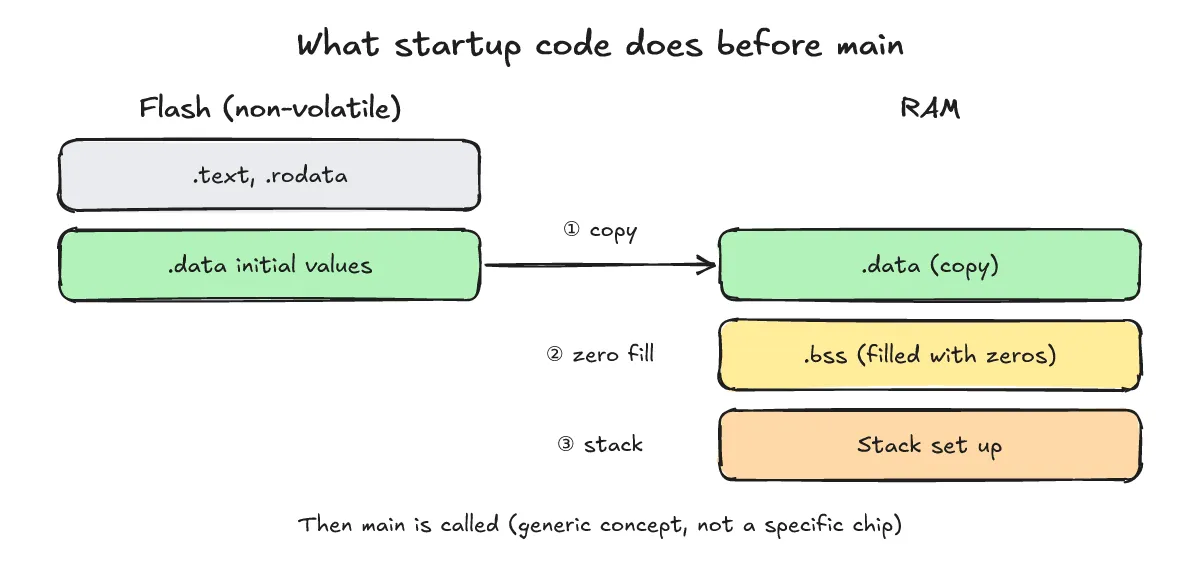
The full boot flow is covered in the embedded Linux boot process, from bootloader to userland (Korean), and the build order in What Is Cross-Compiling? Building with ARM gcc and Running It in QEMU, Step by Step.
How should I answer this in an interview?
One-line answer: Start with “a non-zero initializer means .data, none or zero means .bss, and the file records only the size of .bss,” then back it up with the size output.
An answer outline:
- Global and static variables with a non-zero initial value go into .data, and those initial values are stored in the file (in flash on embedded targets).
- Global and static variables with no initializer or a zero value go into .bss, and the file records only the size.
- Startup code (or the loader) initializes .data and zero-fills .bss before main runs.
- The
sizecommand shows text, data, and bss; a large global zero array grows only bss and barely changes the file size.
What are the frequently asked questions?
One-line answer: The section a variable lands in depends on its initializer and kind; the four most common cases are covered below.
Where does a static local variable go?
It depends on the initializer. A non-zero initial value puts it in .data; no initializer or zero puts it in .bss.
Where does a const global variable go?
With GCC on this x86-64 host it went into .rodata (read_only). It may differ by toolchain.
Is a global initialized to zero in .data or .bss?
With GCC it is .bss. The zero_static entry in the output above is the evidence.
How does this relate to stack overflow?
The stack and heap are not part of these sections. A large local array uses the stack, while a large global zero array uses .bss.
What related posts are worth reading?
One-line answer: The posts on cross toolchains, gdb, cross-compiling, and the embedded Linux boot process pair well with this one.
- aarch64 cross-compile CMake toolchain
- gdb
- What Is Cross-Compiling? Building with ARM gcc and Running It in QEMU, Step by Step
- Embedded Linux boot process, from bootloader to userland (Korean)
What are the sources?
One-line answer: The GNU ld manual, the GNU binutils size and objdump docs, and my own measurements.
- GNU ld manual (checked 2026-10-23)
- GNU binutils size (checked 2026-10-23)
- GNU binutils objdump (checked 2026-10-23)
- Own measurement: 2026-10-23 KST, x86-64 Linux host (section sizes vary with architecture, compiler, and options)