Learning how to use Ollama on Linux starts with installing the binary, running the local server (ollama serve), registering a language model, and calling it either from the command line (ollama run) or over the local REST API on 127.0.0.1:11434 with curl. Grounded in the official documentation and verified in this post’s environment (x86-64 Linux (Debian 13), 8 CPU cores, no GPU, no systemd, Ollama 0.40.14), this guide walks through setting up a small model (SmolLM2-360M-Instruct), running a first prompt, and calling the HTTP endpoints.
Key Summary
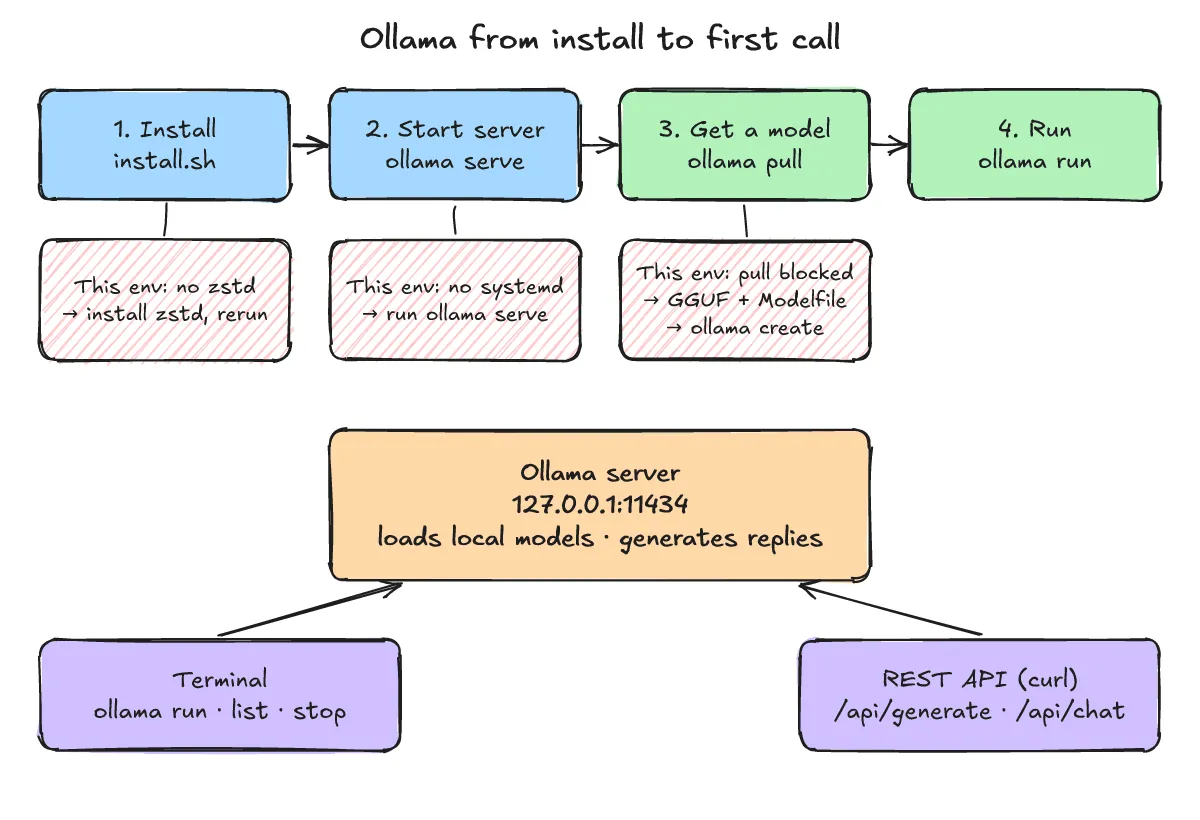
In this post’s environment (x86-64 Linux (Debian 13), 8 CPU cores, no GPU, no systemd, Ollama 0.40.14), the official install script initially stopped because zstd was missing and completed once zstd was installed; because systemd was not running, the server was started manually with ollama serve; and because this environment’s network policy refused the model download redirect during ollama pull smollm2:360m, a publicly released GGUF file was registered with a one-line Modelfile and ollama create before testing ollama run and the REST API on 127.0.0.1:11434.
What is Ollama and what can you do with it?
One-line answer: Ollama is a tool for downloading, running, and managing large language models locally through a command-line interface (CLI) and a REST API on 127.0.0.1:11434.
Local server (ollama serve), CLI, and REST API structure
According to the official FAQ and API documentation, Ollama binds a local server to 127.0.0.1 port 11434 by default. Once the server is running, you can run and manage models with the ollama CLI or send HTTP requests to the local REST API.
Model names follow the model:tag format, where omitting the tag defaults to latest. Other OS installers exist per the official docs; this post covers Linux.
How do you install Ollama on Linux?
One-line answer: Run the official install script (install.sh) after ensuring zstd is installed, and start the server manually with ollama serve if systemd is not running.
Official install command and resolving the missing zstd error
The official Linux documentation provides the following one-line install command (in this post, the same script was saved first and executed with sh install.sh):
$ curl -fsSL https://ollama.com/install.sh | shOn the first run, the script stopped because zstd was missing (excerpt of the first 2 lines):
>>> Installing ollama to /usr/local
ERROR: This version requires zstd for extraction. Please install zstd and try again:
After installing zstd, running the script a second time completed the installation. Below is an excerpt of the >>> status lines and the systemd warning from the second run (one GPU-detection warning line and the download progress bar are omitted):
>>> Cleaning up old version at /usr/local/lib/ollama
>>> Installing ollama to /usr/local
>>> Downloading ollama-linux-amd64.tar.zst
>>> Creating ollama user...
>>> Adding ollama user to video group...
>>> Adding current user to ollama group...
>>> Creating ollama systemd service...
WARNING: systemd is not running
>>> The Ollama API is now available at 127.0.0.1:11434.
>>> Install complete. Run "ollama" from the command line.
As a manual install alternative, the official Linux documentation also describes downloading and extracting the package ollama-linux-amd64.tar.zst into /usr, as well as adding Ollama as a systemd startup service (recommended).
systemd is not running warning and starting ollama serve manually
Because systemd was not running in this environment, the install script could not start the background service. Following the manual startup step in the official docs, the server was started by hand with ollama serve in one terminal and verified in another terminal with ollama -v:
$ ollama -v
ollama version is 0.40.14
How do you download or import a model to run?
One-line answer: On a standard network you run ollama pull <model> or ollama run <model>, or if redirects are blocked you can register a local GGUF file using a one-line Modelfile and ollama create.
Standard ollama pull vs. importing a GGUF file
On a normal network, the official way from the CLI documentation is to run ollama pull <model> or ollama run <model>, which downloads the model automatically (commands from the official docs, not run output):
ollama pull <model>
ollama run <model>
In this environment, running ollama pull smollm2:360m failed at the model-file download step because of this environment’s network policy (the download redirect was refused). This is an environment limitation; on a normal network, use ollama pull <model> or ollama run <model>.
To bring the model in here, the official “Importing a GGUF model” method from the documentation was used: a publicly released SmolLM2-360M-Instruct Q8_0 GGUF file was downloaded with curl, and a one-line Modelfile pointing to the file with FROM was created. Per the official import documentation, Ollama does not quantize GGUF models during import.
FROM ./smollm2-360m-instruct-q8_0.ggufNext, ollama create registered the model locally (progress lines removed):
$ ollama create smollm2-360m -f Modelfile
gathering model components
parsing GGUF
using existing layer sha256:48ab3034d0dd401fbc721eb1df3217902fee7dab9078992d66431f09b7750201
using autodetected template chatml
creating new layer sha256:f02dd72bb2423204352eabc5637b44d79d17f109fdb510a7c51455892aa2d216
writing manifest
success
Checking model specs with ollama list and ollama show
Running ollama list (or ollama ls per the CLI docs) confirms that the model is registered:
$ ollama list
NAME                   ID              SIZE      MODIFIED
smollm2-360m:latest    0f1656a1eca9    386 MB    Less than a second ago
Running ollama show prints the model metadata, including parameters (361.82M), context length (8192), and quantization (Q8_0):
$ ollama show smollm2-360m
  Model
    architecture        llama
    parameters          361.82M
    context length      8192
    embedding length    960
    quantization        Q8_0
    template source     go_template
  Capabilities
    completion
  Parameters
    stop    "<|im_start|>"
    stop    "<|im_end|>"
For details on what the Q8_0 quantization format means for memory usage, see What is quantization? FP16, INT8 and INT4 and why LLM memory shrinks. To understand how context length 8192 sets the token limit, see What are tokens and the context window? How LLMs count text and why length limits exist.
How do you run a model for the first time?
One-line answer: Pass a prompt argument to ollama run <model> "<prompt>" for a one-shot response, or omit the prompt to enter interactive mode.
One-shot execution with ollama run and interactive mode
Passing a prompt string on the command line runs a single generation and prints the reply:
$ ollama run smollm2-360m "What is the capital of France? Answer in one sentence."
The capital of France is Paris.
Per the official CLI documentation, running ollama run <model> without a prompt argument starts an interactive session in the terminal. Note that the model’s answers here and in the API section below are just what this small model generated—they are examples of output, not facts.
How do you call the API?
One-line answer: Send requests with curl to /api/generate, /api/chat, /api/tags, and /api/version on port 11434, using "stream": false for a single JSON response or the default NDJSON streaming mode.
Single-response calls to /api/generate and /api/chat (“stream”: false)
According to the official API reference (docs/api.md), POST /api/generate generates a response for a single prompt, while POST /api/chat generates the next message from a messages array containing role and content fields. Both endpoints stream responses by default, which can be disabled by passing {"stream": false} (the final JSON object also includes duration statistics returned in nanoseconds).
You can pass generation parameters such as temperature and seed inside an options object. The API calls below use "temperature": 0, "seed": 42; for background on how temperature controls output randomness, see What are temperature and top-p? Why LLM answers vary every time.
Here is POST /api/generate with "stream": false, piped to jq -r .response:
$ curl -s http://localhost:11434/api/generate -d '{"model": "smollm2-360m", "prompt": "Why is the sky blue? Answer in one sentence.", "stream": false, "options": {"temperature": 0, "seed": 42}}' | jq -r .response
The sky appears blue because of a phenomenon known as Rayleigh scattering, which occurs when sunlight enters Earth's atmosphere and encounters tiny molecules of gases such as nitrogen and oxygen. These molecules scatter the shorter wavelengths of light, such as blue and violet, in all directions, while the longer wavelengths, like red and orange, are scattered in a more random pattern. This scattering effect is responsible for the blue color of the sky, as the blue light is scattered more efficiently than the longer wavelengths.
And here is POST /api/chat with "stream": false, extracting the assistant’s .message object:
$ curl -s http://localhost:11434/api/chat -d '{"model": "smollm2-360m", "messages": [{"role": "user", "content": "Name three primary colors."}], "stream": false, "options": {"temperature": 0, "seed": 42}}' | jq .message
{
  "role": "assistant",
  "content": "Three primary colors are red, blue, and yellow. These colors are the building blocks of all other colors and are used to create all other colors in the color spectrum."
}
As seen in the chat answer “red, blue, and yellow,” small models can give loose answers, so treat these responses strictly as output examples.
Default NDJSON streaming responses and querying /api/tags and /api/version
When stream is omitted, Ollama streams responses as newline-delimited JSON objects, one token chunk per line. Below are the first 3 lines from a streaming /api/generate call (created_at is in UTC):
$ curl -s http://localhost:11434/api/generate -d '{"model": "smollm2-360m", "prompt": "Say hi.", "options": {"temperature": 0, "seed": 42}}' | head -n 3
{"model":"smollm2-360m","created_at":"2026-11-03T22:03:59.202964822Z","response":"Hello","done":false}
{"model":"smollm2-360m","created_at":"2026-11-03T22:03:59.209502177Z","response":"!","done":false}
{"model":"smollm2-360m","created_at":"2026-11-03T22:03:59.215637513Z","response":" How","done":false}
To list local models over HTTP, call GET /api/tags; to check the server version, call GET /api/version:
$ curl -s http://localhost:11434/api/tags | jq -r ".models[].name"
smollm2-360m:latest
$ curl -s http://localhost:11434/api/version
{"version":"0.40.14"}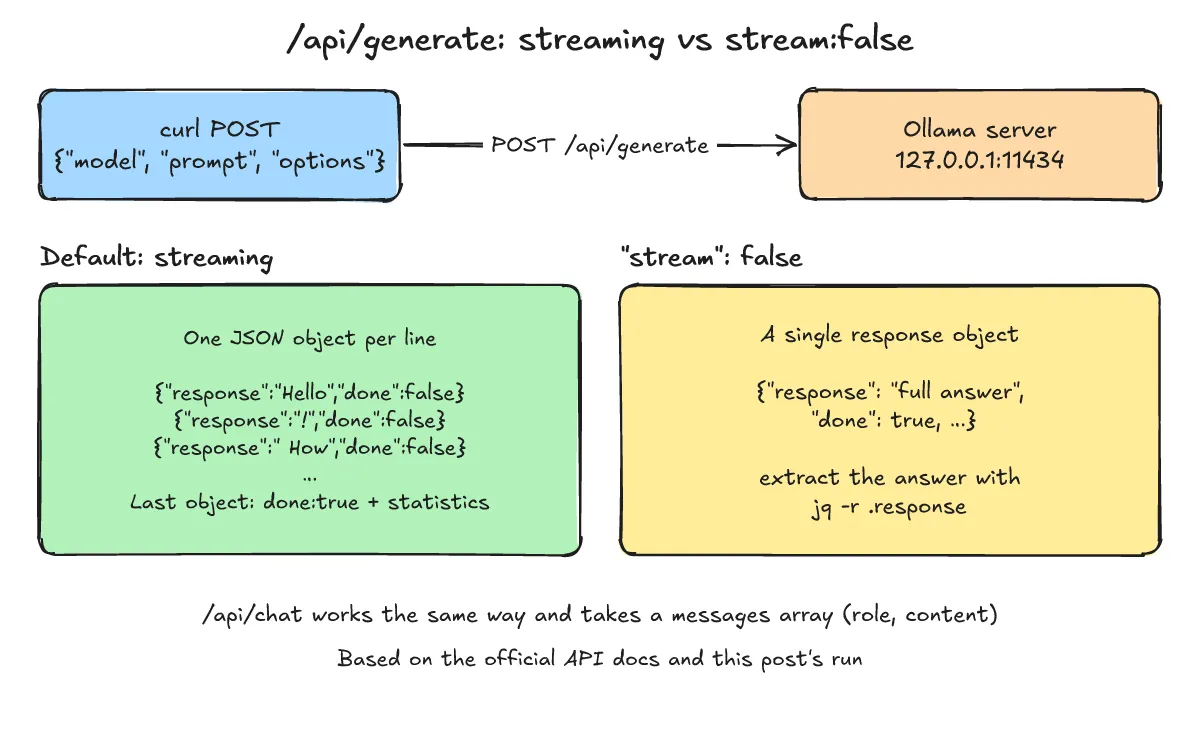
How do you manage models and free memory?
One-line answer: Models stay loaded in memory for 5 minutes by default, and you can unload them immediately with ollama stop and check loaded models with ollama ps.
Unloading with ollama stop, checking ollama ps, and the 5-minute keep-alive
Per the official FAQ, Ollama keeps models in memory for 5 minutes by default after a request. Running ollama stop <model> unloads a model immediately, and ollama ps lists currently running models. You can also control the retention duration with the keep_alive API parameter or the OLLAMA_KEEP_ALIVE environment variable.
$ ollama stop smollm2-360m
$ ollama ps
NAME    ID    SIZE    PROCESSOR    CONTEXT    RUNNER    UNTIL
An empty table from ollama ps confirms that no model is currently loaded in memory. To delete a model from disk entirely, the official CLI documentation provides ollama rm <model>.
Configuring bind address (OLLAMA_HOST) and model directory (OLLAMA_MODELS)
The official FAQ and CLI documentation describe the following configuration options:
- Changing the bind address: Ollama binds
127.0.0.1port11434by default; setOLLAMA_HOSTto change the bind address or port. - Changing the model storage path: On Linux, a standard service install stores models at
/usr/share/ollama/.ollama/models; setOLLAMA_MODELSto use a different directory. - Listing environment variables: Run
ollama serve --help(from the official CLI docs) to see the environment variables recognized by the server.
What should you check when installation or execution fails?
One-line answer: Check whether zstd is installed, verify that ollama serve is running via ollama -v or /api/version, and use GGUF import if network policy blocks ollama pull redirects.
Three issues encountered in this environment and how to verify the server
Here are the three issues encountered in this post’s environment and how each was resolved:
- Missing
zstdduring installation: If the install script stops withERROR: This version requires zstd for extraction., installzstdfirst and re-run the script. WARNING: systemd is not running: In environments withoutsystemd, the service cannot start automatically. Start the server manually withollama serve, and checkollama -vorcurl -s http://localhost:11434/api/versionto confirm that the server is up.ollama pulldownload blocked by network policy: When redirect rules block model downloads in a restricted environment, download the GGUF file directly and register it locally with a one-lineModelfile(FROM ./file.gguf) andollama create <name> -f Modelfile.
What are the frequently asked questions (FAQ)?
One-line answer: Here are quick answers on the default port, model memory retention time, and importing a single GGUF file.
What is the default address and port for the Ollama API?
Per the official FAQ, Ollama binds to 127.0.0.1 on port 11434 by default. You can change the bind address with the OLLAMA_HOST environment variable.
How long does a model stay loaded in memory after running?
By default, models are kept in memory for 5 minutes. You can unload a model immediately with ollama stop <model>, or adjust the retention time with the keep_alive API parameter or OLLAMA_KEEP_ALIVE.
Can you import a downloaded GGUF file directly without re-quantizing it?
Yes. Create a Modelfile containing FROM /path/to/file.gguf and run ollama create <name> -f Modelfile. According to the official import documentation, Ollama does not quantize GGUF models during import.
What related posts are worth reading?
One-line answer: These related posts explain quantization (Q8_0), sampling parameters (temperature), and the context window (8192).
- What is quantization? FP16, INT8 and INT4 and why LLM memory shrinks
- What are temperature and top-p? Why LLM answers vary every time
- What are tokens and the context window? How LLMs count text and why length limits exist
What are the sources?
One-line answer: Below are the official Ollama documentation pages and API reference checked for this post.
- Ollama docs: Linux (checked 2026-11-04)
- Ollama docs: Importing a model (checked 2026-11-04)
- Ollama docs: CLI reference (checked 2026-11-04)
- Ollama API reference (docs/api.md) (checked 2026-11-04)
- Ollama docs: FAQ (checked 2026-11-04)