An ESP32 emulator is a tool developers look for when they want to run compiled ESP32 firmware on a PC or in a web browser without physical hardware at hand, or before flashing a board. No ESP32 firmware build or emulation was executed on this machine for this post; instead, this conceptual overview summarizes what an emulator does, when to use it, how it differs from a physical board, and what tools exist based on official documentation, open-source repositories, and community discussions.
Key takeaway
An ESP32 emulator is a tool that imitates the ESP32 CPU and selected peripherals in software so you can run compiled firmware on a PC or in a browser without a physical board. It is useful for verifying logic and iterating quickly, but behaviors that depend on real hardware—such as strict timing, power, wireless (Wi-Fi/BLE), and analog signals—must still be verified on an actual board.
What is an ESP32 emulator?
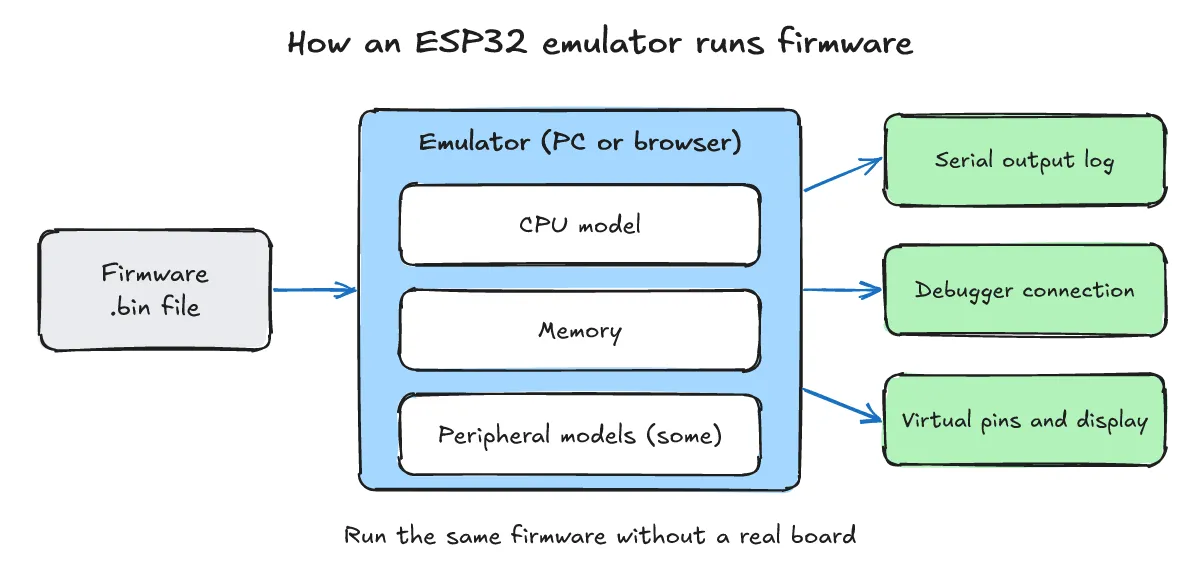
One-line answer: It is a software tool that imitates the ESP32 CPU instructions, memory, and selected peripherals so that the same firmware binary can run without physical hardware.
In general terms, an emulator imitates the target hardware (CPU instructions and peripherals) so that the same firmware binary runs directly, whereas a simulator models behavior at a higher level and may not execute the real binary.
For example, the QEMU-based emulator described in Espressif’s ESP-IDF Programming Guide emulates the CPU, memory, and several peripherals of the ESP32. Compiled firmware is fed into the emulated CPU and peripheral models, producing output such as serial logs over an emulated UART.
When is it useful to use one?
One-line answer: It is useful when no physical board is at hand, for automated verification in CI, for GDB-based logic debugging, or for safely testing irreversible security settings.
- Testing without a physical board: According to the Espressif ESP-IDF Programming Guide (“QEMU Emulator”),
idf.pycan run and debug applications in QEMU without flashing real hardware. - Serial monitoring and GDB logic debugging: The official guide describes running an application with IDF Monitor connected to the emulated UART and debugging with GDB. Documented commands include
idf.py qemu monitorandidf.py qemu gdb(commands documented in the official guide, not executed in this post). For general GDB crash debugging on embedded Linux, see How to find crash causes with gdb on embedded Linux: core dump and gdbserver. - Virtual devices and risk-free security verification: The ESP-IDF guide also describes a virtual framebuffer device that does not exist on real ESP32 hardware, as well as eFuse emulation for testing security features without performing irreversible operations on real hardware.
- Development, testing, and CI automation: In the Show HN thread presenting an open-source browser-based ESP32 emulator, the author specifically asked what would be needed before developers use such a tool for development, testing, or CI.
How does it differ from a real board?
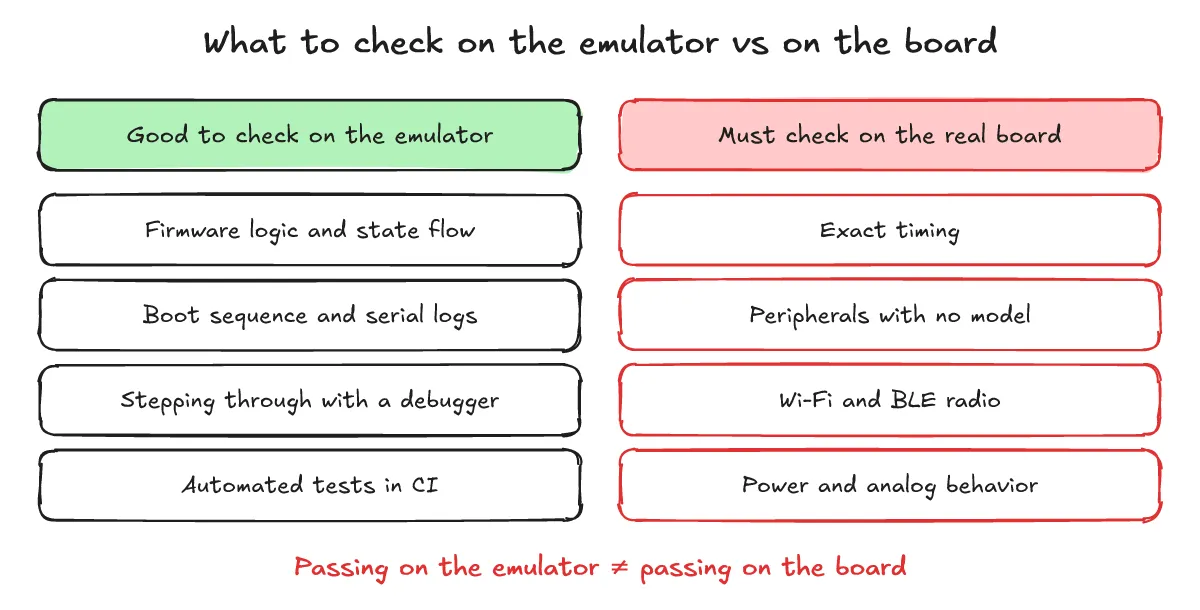
One-line answer: Because strict timing, peripheral coverage, wireless (Wi-Fi/BLE), and power or analog characteristics differ from physical hardware, passing in an emulator does not guarantee passing on a real board.
Passing in firmware simulation or emulation does not mean the firmware will pass on physical hardware. Key hardware differences highlighted in community discussions and hardware design include:
- Peripheral coverage: Emulating peripherals in sufficient detail is difficult.
- Strict timing: Timing-sensitive features—for example, driving LED strips via DMA or RMT—only work if timing is emulated faithfully.
- Wireless (Wi-Fi/BLE): Wireless communication depends on physical RF hardware and real radio conditions.
- Power and analog behavior: Power consumption and analog signal characteristics rely on physical circuitry and cannot be fully replaced by software emulation alone.
What tools are available?
One-line answer: Available tools include Espressif’s QEMU fork documented in ESP-IDF, the open-source browser and local emulator esp32sim, and the web-based simulator Wokwi.
- Espressif QEMU fork: Documented in the Espressif ESP-IDF QEMU Emulator guide, Espressif maintains a fork of QEMU with ESP32 support that emulates the CPU, memory, and several peripherals of the ESP32.
- esp32sim: Hosted at the mikroverk/esp32sim GitHub repository, described as: “Open-source ESP32 emulator. Run real firmware locally or in your browser — no hardware, no cloud, no subscription.” Its author presented it in Show HN: Esp32sim – Run ESP32 firmware in the browser (submitted 2026-10-17) and asked what it would need for development, testing, or CI use.
- Wokwi: Wokwi is a web-based simulator that commenters in the Show HN thread brought up for comparison. Tools for running firmware without a board already exist.
QEMU is also used on the embedded Linux side; for an example of booting a minimal image in QEMU, see From Yocto bitbake install to first build: booting core-image-minimal in QEMU. For building binaries for another target architecture and running them in QEMU, see What is cross-compilation? Building with ARM gcc and running in QEMU.
What are the frequently asked questions?
One-line answer: Here are answers to three common questions about trusting emulator results, checking wireless features, and using emulators in CI pipelines.
If firmware passes in the emulator, will it work the same way on a real board?
No. While an emulator is useful for checking logic and iterating quickly, timing-sensitive features (such as DMA/RMT control), detailed peripheral behaviors, and power or analog characteristics differ from physical hardware and must be re-verified on a real board.
Can wireless features like Wi-Fi or BLE be verified in an emulator?
It depends on the tool, and because wireless communication relies on real RF hardware, wireless behavior should be verified on a physical board.
Can an ESP32 emulator be used for automated verification in a CI pipeline?
In general concept, yes. The Espressif ESP-IDF documentation describes running and debugging applications in QEMU without flashing real hardware, and the author of the Show HN esp32sim thread explicitly asked about using emulation for development, testing, and CI.
What related posts are worth reading?
One-line answer: Here are related posts covering QEMU execution environments, cross-compiling for target architectures, and GDB crash debugging.
- From Yocto bitbake install to first build: booting core-image-minimal in QEMU
- What is cross-compilation? Building with ARM gcc and running in QEMU
- How to find crash causes with gdb on embedded Linux: core dump and gdbserver
- What is endianness?
What are the sources?
One-line answer: Below are the official documentation, open-source repository, and community thread sources referenced in this post.
- Show HN: Esp32sim – Run ESP32 firmware in the browser (submitted 2026-10-17, checked 2026-10-25)
- GitHub — mikroverk/esp32sim (checked 2026-10-25)
- Espressif ESP-IDF Programming Guide — QEMU Emulator (ESP32) (checked 2026-10-25)
- Wokwi (checked 2026-10-25)