A stack overflow in embedded and firmware systems occurs when the stack used by function calls, local variables, and interrupts grows past its assigned boundary and overwrites neighbouring RAM. This guide organizes the causes, why MCU environments make the failure especially dangerous, how to detect it statically and dynamically, and how to prevent it so you can give a clear, structured explanation when asked.
Summary
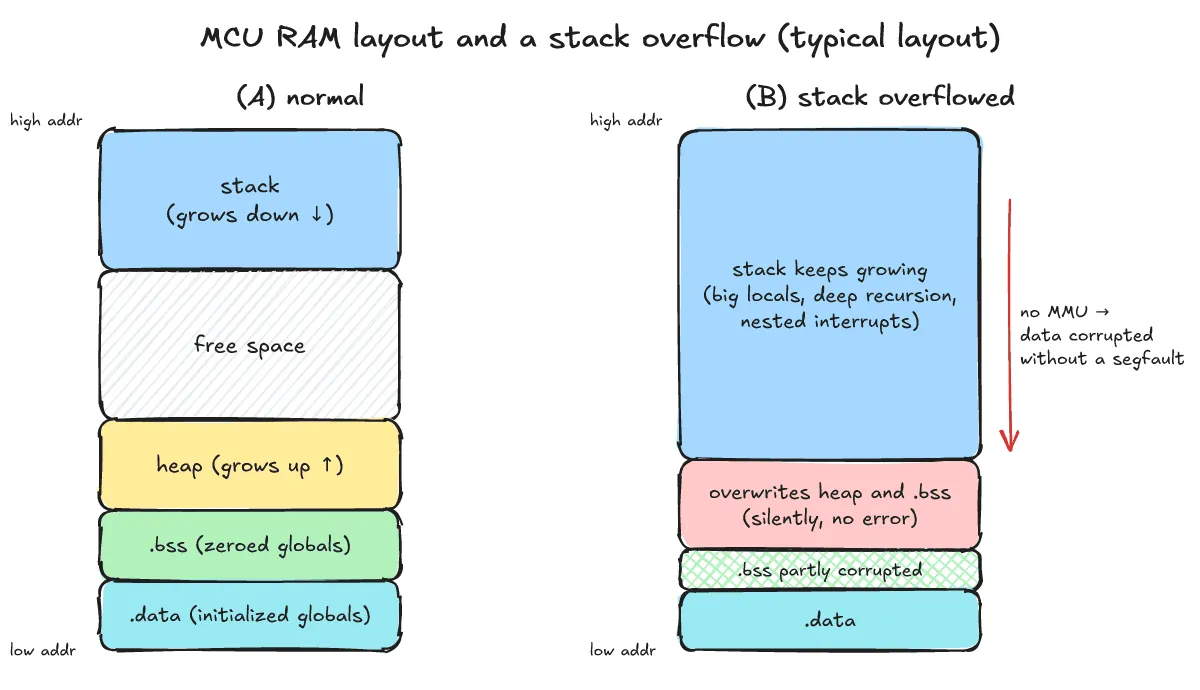
A stack overflow happens when the stack used by function calls, local variables, and interrupts exceeds its allocated size and overwrites adjacent memory. On an MCU without an MMU, this rarely triggers an immediate clean fault; instead, neighbouring data such as .bss or the heap is silently corrupted, leading to hard-to-trace malfunctions or resets. To find it, inspect per-function frame sizes at compile time with -fstack-usage and -Wstack-usage, and check peak usage at run time with stack painting or FreeRTOS overflow checking and high water mark APIs. To prevent it, move large buffers off the stack, eliminate recursion, and size stacks from measured usage plus a margin.
What is a stack overflow, as asked in embedded interviews?
One-line answer: It is a condition where the stack region used by function calls, local variables, and interrupts grows beyond its allocated size and overwrites neighbouring memory.
Every time a function is called, a stack frame holding the return address, saved registers, and local variables is pushed onto the stack and released when the function returns. When an interrupt fires, the processor also saves context on the stack.
If deep call chains, large locals, or interrupts push the stack pointer past the configured stack boundary, a stack overflow occurs and writes spill directly into whatever memory sits beyond the limit.
Why is it more dangerous on an MCU?
One-line answer: On an MCU without an MMU, there is no immediate clean segfault; the overflow silently overwrites .bss, the heap, or other task stacks, causing delayed malfunctions or resets.
Many MCUs lack a Memory Management Unit (MMU), and the main stack typically grows downward from the top of RAM toward the heap and .bss section. Instead of stopping immediately with a clean fault, an overflow silently corrupts adjacent data:
- Random corruption of global or static variables
- Delayed
HardFaultexceptions or CPU resets after pointers or return addresses are clobbered - Watchdog resets when corrupted state sends the firmware into an infinite loop or hang
- Bugs that appear to work in debug builds but fail in release builds when compiler optimizations or interrupt timing shift the stack layout
For where global and static variables reside in RAM, see the post on .data vs .bss. For how a hung system ends in a reset, see the post on how a watchdog timer works.
What are the common causes?
One-line answer: Large local arrays, deep or unbounded recursion, nested interrupts, undersized task stacks, and printf-family calls are the most common causes.
- Large local arrays: Declaring large buffers as local variables inside a function consumes substantial stack space in a single call.
- Deep or unbounded recursion: Each recursive call allocates another stack frame until the base case is reached.
- Nested interrupts: Multiple interrupts sharing the same stack pile up saved contexts and handler frames on top of one another.
- Task stacks sized too small: In an RTOS, each task has its own stack sized at creation; underestimating worst-case paths leads to overflow.
printf-family functions: As the FreeRTOS Kernel Book notes, formatting functions such asprintfandsprintfoften require a much bigger stack.
How do you find it at compile time?
One-line answer: Use GCC’s -fstack-usage option to output per-function frame sizes to .su files and -Wstack-usage=byte-size to warn when a function may exceed N bytes.
According to the GCC manual, -fstack-usage writes per-function stack usage information into a file named by appending .su to the auxname (the basename of the source file or output object). Each line lists the function with its source location, the number of bytes, and qualifiers (static, dynamic, bounded). Pairing it with -Wstack-usage=byte-size warns whenever a function’s conservative stack usage estimate (including alloca and VLA space) might exceed byte-size.
Here is stack/stack.c, which contains a function with a large local array and a recursive function:
#include <stdio.h>
#include <string.h>
int big(int n){ char buf[4096]; memset(buf,n,sizeof buf); return buf[n%4096]; }
int rec(int n){ volatile char pad[256]; pad[0]=n; return n? rec(n-1)+pad[0] : 0; }
int main(){ printf("%d %d\n", big(3), rec(10)); }
Below is the result checked in this post’s runtime environment (gcc (Debian 14.2.0-19) 14.2.0, x86-64 Linux, -O0). Note that these are x86-64 numbers, NOT MCU numbers; actual frame sizes depend on the target architecture, compiler, and optimization options:
$ gcc -O0 -fstack-usage -Wstack-usage=1024 -c stack.c
stack.c: In function ‘big’:
stack.c:3:5: warning: stack usage is 4128 bytes [-Wstack-usage=]
    3 | int big(int n){ char buf[4096]; memset(buf,n,sizeof buf); return buf[n%4096]; }
      |     ^~~
$ cat stack.su
stack.c:3:5:big	4128	static
stack.c:4:5:rec	288	static
stack.c:5:5:main	32	static
Here big declares a 4096-byte local array and uses 4128 bytes static (the frame includes more than the array itself), so it exceeds the 1024-byte threshold and triggers the warning stack usage is 4128 bytes. By contrast, rec uses 288 bytes static per call and does not trigger the per-function warning, yet calling rec(10) recursively stacks roughly eleven frames on top of each other, making total usage depend on call depth. Finally, main uses 32 bytes static.
In the .su qualifiers, static means a fixed frame is allocated on entry and released on exit. dynamic means extra stack adjustments occur in the function body; when paired with bounded, the amount is bounded at compile time and the number is an upper bound, whereas dynamic without bounded means the number only represents the bounded part. Matching this, -Wstack-usage=byte-size emits "stack usage is N bytes" (fully static), "stack usage might be N bytes" (dynamic but bounded), or "stack usage might be unbounded".
Keep in mind that both flags report per-function numbers only: total stack needed equals the deepest call chain sum plus interrupt usage, and recursion or function pointers require manual analysis.
How do you find it at run time?
One-line answer: Use stack painting, FreeRTOS overflow checks and the high water mark API, and MPU guard regions or hardware stack limit features where the core provides them.
How does stack painting work?
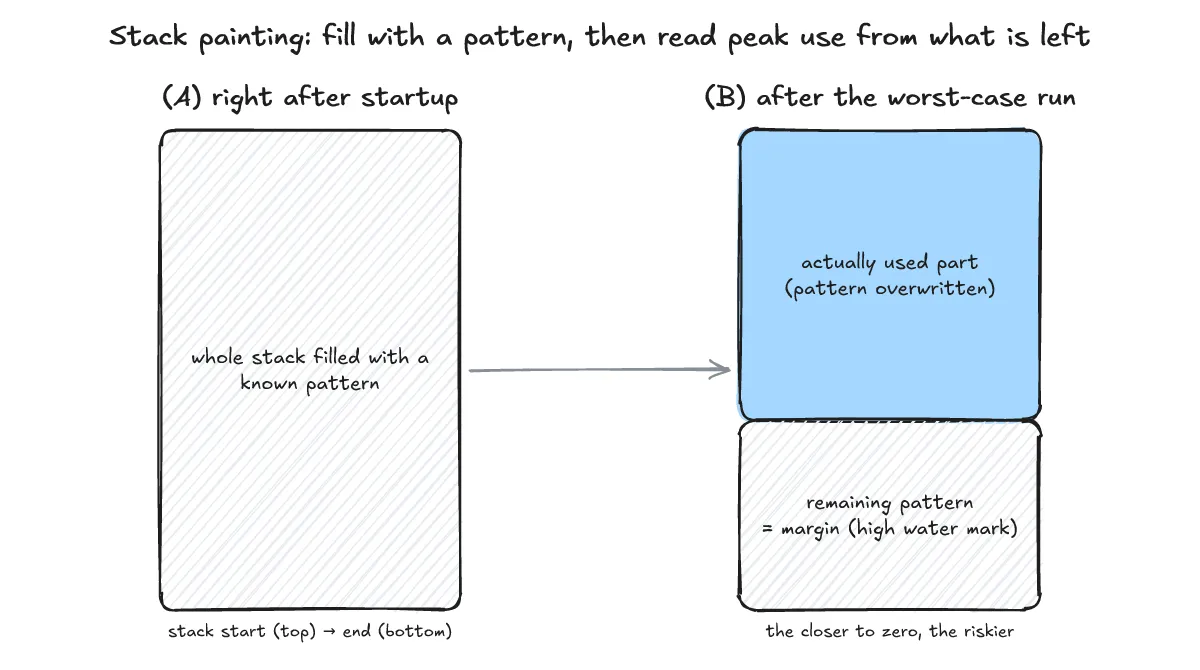
Stack painting fills the stack with a known pattern at startup, runs worst-case scenarios, and then checks how much of that pattern remains untouched. The overwritten portion shows actual peak usage, while the remaining pattern shows the safety margin. The FreeRTOS high water mark feature described below works on the same idea.
What are FreeRTOS configCHECK_FOR_STACK_OVERFLOW and the hook function?
In FreeRTOS, each task has its own stack whose size is given when the task is created. Setting configCHECK_FOR_STACK_OVERFLOW in FreeRTOSConfig.h enables runtime overflow detection:
- Method 1 (set to
1): After a task’s context is saved when it is swapped out, the kernel checks that the stack pointer remains within the valid stack range. It is quick, but can miss overflows that happen and recede between context switches. - Method 2 (set to
2): Adds to Method 1 by filling the stack with a known pattern at task creation and checking the last few bytes of the valid stack area for that pattern. It is very likely—though not guaranteed—to catch all overflows, and checking adds context switch overhead. - Value
3(only on selected ports): Checks the ISR stack as well and triggers an assert rather than calling the overflow hook.
When checking is enabled, the application provides a hook function (the book lists slightly different parameter types, so think of it as receiving the task handle and name):
void vApplicationStackOverflowHook(TaskHandle_t xTask, char *pcTaskName);The hook is called from interrupt context. There is no real way to recover from an overflow once memory is corrupted; in a severe overflow, the parameters themselves may be corrupted, or a CPU fault may happen before the hook even runs.
Below is a configuration example (not run) for FreeRTOSConfig.h:
#define configCHECK_FOR_STACK_OVERFLOW 2
#define INCLUDE_uxTaskGetStackHighWaterMark 1
How do you check remaining space with uxTaskGetStackHighWaterMark?
With INCLUDE_uxTaskGetStackHighWaterMark set to 1, calling uxTaskGetStackHighWaterMark(TaskHandle_t xTask) returns the minimum amount of remaining (free) stack space since the task started (passing NULL queries the calling task, and uxTaskGetStackHighWaterMark2 differs only in return type). The closer the value is to zero, the closer the task has come to overflowing. Its unit is words, not bytes: as documented in task.h, on a 32-bit machine a value of 1 means 4 bytes.
What are MPU guard regions and hardware stack limit features?
Some cores provide hardware stack limit checking or an MPU guard region. Placing an inaccessible guard region at the end of the stack or configuring a hardware stack limit triggers an immediate fault on overflow before neighbouring data is silently overwritten.
For post-crash analysis with a debugger, see Finding crash causes with gdb in embedded Linux: core dump and gdbserver, and for hunting memory errors on a PC build, see What is valgrind? How it differs from ASan when hunting C/C++ memory leaks.
How do you prevent it?
One-line answer: Move big buffers off the stack, remove recursion, size stacks from measurements with a margin, keep ISRs short, and keep checks on in development.
- Move large buffers to static or global storage: Keep large arrays out of local stack frames, while watching out for lost reentrancy and thread/ISR sharing issues.
- Remove or bound recursion: Rewrite recursive logic as loops or enforce a fixed maximum call depth.
- Size stacks from measurement with a margin: Combine compile-time
.suanalysis with runtime stack painting or high water mark readings and add a safety margin. - Keep ISRs short: Do minimal work inside interrupts and hand off data to a task through a fixed-size buffer.
- Enable checks during development: Keep RTOS stack overflow checking and MPU guard regions or hardware stack limits enabled where the core provides them.
For passing data from an ISR to a task through a fixed buffer, see the post on implementing a ring buffer.
How do you summarize it in a short answer?
One-line answer: Summarize the cause and MCU risk, compile-time and runtime detection, and prevention in three concise sentences.
When asked for a short explanation, you can structure the response into three sentences:
- Cause and MCU risk: A stack overflow happens when large local buffers, deep recursion, or nested interrupts push the stack past its allocated size; on an MCU without an MMU, it silently overwrites
.bss, the heap, or other task stacks instead of raising a clean segfault. - Detection: At compile time, use GCC’s
-fstack-usageand-Wstack-usageto check per-function frame sizes; at run time, use stack painting or FreeRTOSconfigCHECK_FOR_STACK_OVERFLOWanduxTaskGetStackHighWaterMark(measured in words) to verify peak usage. - Prevention: Move large buffers to static or global storage (watching reentrancy), eliminate recursion, keep ISRs short, size stacks from worst-case measurements with a safety margin, and enable MPU guard regions or hardware stack limits where the core provides them.
What are the frequently asked questions?
One-line answer: Here are concise answers on how stack overflow differs from buffer overflow, the unit of the high water mark, and what happens when the heap and stack collide.
Are a stack overflow and a buffer overflow the same thing?
No. A stack overflow is when the stack region as a whole exceeds its allocated size, whereas a buffer overflow is writing past the end of an array (a stack buffer overflow can corrupt return addresses). They are related but different concepts.
What is the unit of the high water mark value?
The unit is words, not bytes. According to FreeRTOS task.h, on a 32-bit machine a value of 1 means 4 bytes, representing the minimum free stack space remaining since the task started.
What happens if the heap and the stack collide?
On bare-metal layouts where the heap and stack grow toward each other, either side silently corrupts the other without an immediate fault. Keep a guard gap between them and monitor both regions.
What related posts are worth reading?
One-line answer: Here are related posts covering memory layout, watchdog resets, ring buffers, and crash or memory debugging.
- post on .data vs .bss
- post on how a watchdog timer works
- post on implementing a ring buffer
- Finding crash causes with gdb in embedded Linux: core dump and gdbserver
- What is valgrind? How it differs from ASan when hunting C/C++ memory leaks
What are the sources?
One-line answer: These are the official GCC manuals, FreeRTOS kernel documentation and book, and the measurement environment details.
- GCC manual: Developer Options (-fstack-usage) (checked 2026-11-02)
- GCC manual: Warning Options (-Wstack-usage) (checked 2026-11-02)
- FreeRTOS: Stack usage and stack overflow checking (checked 2026-11-02)
- FreeRTOS Kernel Book, chapter 13: Troubleshooting (Stack Overflow) (checked 2026-11-02)
- Measured: gcc (Debian 14.2.0-19) 14.2.0, -O0, x86-64 Linux, 2026-11-02